Exhibit 10.32
ASSET PURCHASE AGREEMENT
This Asset Purchase Agreement (this “Agreement”) is entered into as of July 30, 2025 (the “Effective Date”), by and between Lottery.com Inc., a Delaware corporation (“Buyer” or “SEGG”), and Galaxy Racer Holdings Limited, a BVI entity (“Seller”). Each of Buyer and Seller may be referred to hereinafter as a “Party” or, collectively, as the “Parties”.
WHEREAS, Seller is the sole owner of the unencumbered assets listed on Schedule A (collectively, the “Assets”); and
WHEREAS, Seller desires to sell the Assets to Buyer, and Buyer desires to purchase the Assets from Seller, on the terms and conditions set forth herein.
NOW, THEREFORE, in consideration of the mutual promises and agreements herein contained, and certain other good and valuable consideration, the Parties agree as follows:
1. Recitals. The foregoing recitals and all terms and conditions contained therein are material, substantive, and integral provisions of this Agreement and are enforceable as if hereinafter restated.
2. Transactions. Buyer and Seller will engage in the following transactions (collectively, the “Transactions”) prior to, at, or after the Closing (as defined below):
a. Payment of Purchase Price. As consideration for the Assets, Buyer will, at Closing pay and deliver to Seller (or its designees) the sum of Ten Million Dollars USD ($10,000,000.00) (the “Purchase Price”) for 100% of the Assets. The Purchase Price is payable as follows:
i. Buyer to pay Seller (or its designees) Five Million One Hundred Thousand Dollars USD ($5,100,000.00) of the Purchase Price as Payment-In-Kind (as defined below) equivalent to the Purchase Price. The term “Payment-In-Kind shall be defined as restricted stock units of common shares in SEGG to be applied towards the Purchase Price at a fixed price of Three Dollar USD ($3.00) per share (the “Fixed Price”) irrespective of the trading price of SEGG stock at the execution of this Agreement or the Closing Date. At Closing, Buyer shall cause to be issued to Seller (or its designees) the equivalent in restricted stock units of common shares in SEGG to be applied towards the Purchase Price. Seller (or its designees) shall receive the Payment-In-Kind within three business days following the Closing Date. Any Payment-In-Kind made as part of the consideration to satisfy any portion of the Purchase Price shall carry full piggyback registrations rights for the benefit of Seller (or its designees); and
ii. Buyer to pay Seller (or its designees) Four Million Nine Hundred Thousand Dollars USD ($4,900,000.00) by transferring 49% ownership interest in NewCo, a newly formed wholly owned entity of SEGG to be domiciled at the discretion of Buyer that shall hold free and clear of any encumbrances all Assets.
iii. Conveyance of Assets. At Closing, Seller will: (i) sell and convey the Assets exclusively and in their entirety to Buyer by delivery in person or by conveyance of access to the log-in information regarding the Assets; and (ii) take all actions necessary to transfer the license registration of the Assets to Buyer and all other instruments of transfer necessary to transfer good and conveyable title to such Asset licenses, free and clear of all liens, charges, claims, and encumbrances of any nature and third- party licenses, other than the originating ownership licenses or terms of use related thereto (e.g., ICANN) and. Except for the Assets, no other assets or licenses of Seller are included in this Transactions.
| Page 1 of 8 |
Asset Purchase Agreement
iv. True-Up. The Parties agree that in the event that the closing price of the restricted stock units of common shares in SEGG. to be issued to the Seller as above is lower than the Fixed Price on July 30, 2026 (the “Reprice Date”), then the Fixed Price shall be adjusted downward to the VWAP of the common stock for the five (5) consecutive trading days immediately preceding the Reprice Date (the “Market Price”). Accordingly, Buyer shall be obligated to tender Seller additional restricted stock units of common shares in SEGG. to make up the difference between the Fixed Price and the Market Price.
v. Shortfall Earnout. The Parties agree that if the NewCo’s valuation is less than a certain amount (“amount” to be agreed in the Schedule B and defined as “Shortfall Earnout Amount”) on June 30, 2027, then Seller’s equity in NewCo and SEGG (respectively) shall be diluted down on July 1, 2027 by certain percentages prorated based on the Shortfall Earnout Amount (the “Shortfall Earnout Equity”). Shortfall Earnout Amount and Shortfall Earnout Equity collectively referred to herein as “Reverse Earnout”.
vi. No Excessive Earnout. Alternatively, the Parties further agree that no excessive earnout amount shall be included in the SPA
vii. The term “business day” means any day of the week other than Saturday, Sunday, or any other day on which Nasdaq is closed for business. The term “piggyback registration rights” means the right for all Payment-In-Kind shares of SEGG issued at Closing or upon True-Up to be registered alongside any other shares of SEGG that are registered for sale from time to time with the Securities and Exchange Commission (“SEC”) for offer or sale to the public, including pursuant to any amendment of any existing effective or pending registration as at Closing; provided, however, that such term will exclude: (i) any such registration statement that is for the benefit of reselling shareholders who have received shares from SEGG in exchange for cryptocurrency; and (ii) any prior registration statement that excludes the shares of reselling shareholders.
3. Limited Assumption of Liabilities. Buyer does not assume any responsibility for any liabilities or obligations of Seller, fixed or contingent, arising prior to the Closing of the Transactions. No fees, expenses, liabilities, or obligations are being assumed by Buyer, and all such liabilities and obligations incurred by Seller prior to the Effective Date will remain the sole responsibility of Seller. Without limiting the generality of the foregoing, Buyer will not assume, purchase, or be obligated on any existing contracts, licenses, or any ongoing obligations currently existing and binding upon Seller, unless otherwise expressly assumed by Buyer in writing.
4. Bills of Sale and Assignments. Seller agrees to execute any separate bills of sale and assignments of title, in recordable form, as may reasonably be requested by Buyer to effect the sales and assignments embodied in the Transactions.
5. Closing. All Transactions will be conducted and fully performed on a date to be determined by the Parties after the satisfaction of each Closing Contingency (the “Closing”), which date will be on or before 5:00 p.m., Eastern Time, on or before August 1, 2025 (the “Closing Deadline”) or as extended by Buyer as reasonably and commercially required to complete the Transactions as contemplated in this Agreement.
| Page 2 of 8 |
Asset Purchase Agreement
6. Closing Contingencies. It is acknowledged and agreed by the Parties that:
a. Each and every Transaction contemplated by this Agreement is contingent upon and subject to:
i. Formation of NewCo by Buyer; and
ii. The ability of each Party to materially perform each other material Closing obligation hereunder by the Closing Deadline (each a “Closing Contingency”); and
b. Neither Party will be liable to the other Party for any breakup fee or otherwise for any failure to close the Transactions due to a Closing Contingency that is not cured or remedied by the non-performing Party or mutually resolved by the Parties in writing on or before the Closing Deadline, or any permitted extensions thereof.
7. Representations and Warranties of Seller. Seller represents and warrants to Buyer as of the Effective Date and at the Closing that:
a. No Active Litigation. To Seller’s knowledge, there is no action, suit, proceeding, inquiry, or investigation by or before any court, governmental agency, public board or body pending or, to the knowledge of Seller, threatened against the Assets or enjoining Seller’s consummation of the Transactions.
b. No Regulatory Restrictions. Neither Seller nor the Assets are the subject of or party to a memorandum of understanding or any supervisory agreements, cease-and-desist orders, consent agreements, or regulatory restrictions that would affect Seller’s ability to consummate the Transactions.
c. Authority to Contract. Seller has full legal power and authority to perform its obligations under this Agreement, and this Agreement constitutes a legal, valid, and binding obligation of Seller enforceable against it in accordance with its terms, except as enforcement may be limited by bankruptcy, insolvency, liquidation, or other similar laws affecting generally the enforcement of creditors’ rights.
d. Title. Seller has good and conveyable license or title to the Assets, free and clear of all liens, charges, claims, and encumbrances or third-party licenses of any nature, subject to the terms and conditions of use dictated by the issuers of any domain name licenses or account holder agreements.
e. No Past Due Accounts. All Seller third-party accounts relating to the Asset licenses: (i) have positive balances, are current, or have balances not in excess of thirty (30) days in arrears as of the Effective Date; and (ii) are not subject to any known or anticipated third-party claim or liability.
f. Brokers. Buyer shall not be responsible for any any brokerage, finder’s, or other fee or commission in connection with the Transactions based upon arrangements made by or on behalf of Seller.
| Page 3 of 8 |
Asset Purchase Agreement
g. Disclaimer of Other Representations and Warranties. The Assets are conveyed to Buyer with express and implied warranties, including, but not limited to, the warranties of merchantability, fitness for a particular purpose, and non-infringement, and Seller specifically claims such representations or warranties.
8. Representations and Warranties of Buyer. Buyer represents and warrants to Seller as of the Effective Date and at the Closing that:
a. Authority to Contract. Buyer has full legal power and authority to perform its obligations under this Agreement, and this Agreement constitutes a legal, valid, and binding obligation of Buyer enforceable against it in accordance with its terms except as enforcement may be limited by bankruptcy, insolvency, liquidation, or other similar laws affecting generally the enforcement of creditors’ rights.
b. Brokers. No broker, finder, or investment banker is entitled to any brokerage, finder’s, or other fee or commission in connection with the Transactions based upon arrangements made by or on behalf of Buyer.
c. Financing Commitment. Buyer shall commit financing to NewCo up to Fifteen Million Dollars USD ($15,000,000.00) (the “Financing Commitment”) during the first year, under customary financing terms applicable in the United States of America with an interest rate not to exceed statutory usuary limitations (the “SEGG Note”). Notwithstanding the foregoing, the Financing Commitment shall be subject to Buyer’s prior approval (in writing) of certain licenses for football leagues or other sports leagues. For clarity, Buyer shall have the right at its sole discretion to review, select and which licenses, broadcasting or streaming rights for football leagues or other sports leagues NewCo enters into.
9. Termination and Survival. This Agreement will commence on the Effective Date and terminate in the event the Closing has not occurred by the Closing Deadline, as may be extended pursuant hereto. The representations and warranties of the Parties contained in this Agreement, including the Schedules and Exhibits attached hereto, or in any writing delivered pursuant to the provisions hereof, shall survive the Closing for a period of one (1) year.
10. Confidentiality. Each Party agrees to safeguard and hold confidential from disclosure to unauthorized third parties all non-public information relating to this Agreement and the mutual business dealings of the Parties. For purposes of the foregoing, only officers, directors, and employees of either Party or its affiliates, including bankers, broker-dealers, accountants, auditors, and attorneys, shall be authorized parties on a ‘need to know basis’ consistent with their respective positions, legal obligations, and responsibilities. Each Party agrees that it will not make any statements or representations, or otherwise communicate, directly or indirectly, in writing, orally, or otherwise, or take any action which may, directly or indirectly, disparage any Party, its affiliates, or their respective officers, directors, employees, advisors, businesses, or reputations. Notwithstanding the foregoing, nothing in this Agreement shall preclude a Party from making truthful statements or disclosures that are required by applicable law, regulation, or legal process or otherwise make certain public announcements with the consent of the other Party.
| Page 4 of 8 |
Asset Purchase Agreement
11. Indemnities. The Parties each agree to indemnify and hold harmless (the “Indemnifying Party”) the other Party and all of its officers, directors, employees, and agents (the “Indemnified Party”) from and against any and all liability, claim, cost, or expense (including court costs and attorney’s fees) incurred by the Indemnified Party attributable to:
a. Breach. A material breach of any material representation or warranty by the Indemnifying Party, its officers, directors, employees, or agents pursuant to this Agreement; or
b. Default. Any default by the Indemnifying Party, its officers, directors, employees, or agents in any of its obligations or covenants under this Agreement.
12. Third-Party Beneficiaries. This Agreement does not confer any rights or remedies upon any third parties to this Agreement.
13. Notices. All notices under this Agreement will be in writing and will be sent:
If to Buyer, to:
Lottery.com Inc.
5049 Edwards Road, 4th Floor
Fort Worth, Texas 76109
With copies to:
matthew.mcgahan@lottery.com
(will not constitute notice)
If to Seller, to:
Galaxy Racer Holdings Limited (“GXR”)
Attn: Paul P. R. Phanbuh
Vistra Corporate Services Centre, Wickhams Cay II,
Road Town, Tortola, British Virgin Islands
All notices to be sent or delivered hereunder will be deemed to be given or become effective for all purposes of this Agreement as follows: (i) when delivered in person, when given;
(ii) when sent by mail, when received by the person to whom it is given, unless it is mailed by registered, certified or express mail, in which case it will be deemed given or effective on the earlier of the date of receipt or refusal; and (iii) when sent by electronic mail, facsimile or other form of electronic transmission, twelve (12) hours after the transmission with proof that it was sent to the correct electronic mail address, telephone number or similar address, as the case may be.
14. Litigation Notices. In the event a subpoena or other legal process including any notice, order, or inquiry from any state or federal regulatory authority concerning the Assets is served upon Seller, Seller agrees that it will notify Buyer immediately upon receipt of such legal process and will cooperate in a lawful effort to comply with or contest the validity of the legal process, at Buyer’s sole cost and expense.
| Page 5 of 8 |
Asset Purchase Agreement
15. Costs and Fees. Each Party agrees to pay its own costs, expenses, and attorneys’ fees incurred in connection with this Agreement and any enforcement hereof. After Closing, Buyer shall be liable for any license or use fees related to the Assets.
16. Further Acts and Instruments. Each Party agrees to execute and deliver such other and further instruments and to do such other and further acts as may be necessary or desirable to effect the transactions contemplated in this Agreement and carry out the intent and purpose of this Agreement.
17. Call Option. The Parties agree to enter into a call option agreement, whereby Buyer has the irrevocable right to acquire any remaining interest in NewCo up to100% interest in NewCo at the valuation mutually agreed to and later set forth in in the call option agreement, (the “Call Option”) with said Call Option to expire on December 31, 2027. The Call Option may only be exercised by Buyer so long as SEGG remains listed on Nasdaq’s Global Market Exchange and is current with all statutory financial filings at the time Buyer exercises any portion of the Call Option. At the sole discretion of Buyer, the consideration for the Call Option or any portion thereof, may be made in cash or restricted stock units of common shares in SEGG at market value at the time the Buyer exercises its Call Option or any portion thereof.
18. Opportunity to Review and Consultation with Legal Counsel. The Parties acknowledge and agree that they have had a full and fair opportunity to review, comment, and make compromise revisions to this Agreement. Each Party acknowledges that it has had a full and complete opportunity to consult with legal counsel or other advisers of its own choosing concerning the terms, enforceability, and implications of this Agreement, and that no Party has made any representations or warranties to any other Party concerning the terms, enforceability, and implications of this Agreement other than as are reflected in this Agreement.
19. Succession; Assignment. This Agreement and any other agreement or documentation necessary to give effect to the transactions contemplated hereby will bind and inure to the benefit of the heirs, administrators, executors, successors, and assigns of the Parties.
20. Severability. The Parties agree that, if any term or condition of this Agreement is found to be illegal or invalid for any reason whatsoever, such illegality or invalidity will not affect the validity of the balance of this Agreement, and the Parties will substitute for the affected term or condition an enforceable provision that approximates as nearly as possible the intent and economic benefit of the affected term or condition.
21. Entire Agreement. The Parties acknowledge and agree that this Agreement and the documents that are to be executed pursuant to this Agreement contain the entire agreement between or among the Parties, as the case may be, regarding the subject matter hereof and supersede and replace any and all prior oral and written agreements, arrangements, or understandings between or among the Parties, as the case may be, relating to the subject matter hereof.
22. Applicable Law. The Parties agree that this Agreement will be governed by, construed, and enforced in accordance with, and subject to, the laws of the State of Delaware, except with respect to the choice of law provisions thereof.
23. Jurisdiction; Venue. Each Party hereby submits to the jurisdiction and venue of the state and federal courts located in the State of Delaware for purposes of any arbitration or litigation related to this Agreement.
| Page 6 of 8 |
Asset Purchase Agreement
24. No Fiduciary Duty; No Joint Venture. Nothing contained in this Agreement is intended to create any fiduciary duty of one Party to another Party, any joint venture between the Parties, or any partnership or other type of business entity involving the Parties.
25. Remedies. In the event of any breach or threatened breach of any term of this Agreement, a Party seeking relief will be entitled to seek specific performance, injunctive, and other equitable relief, which will be in addition to, and not in lieu of, money damages or any other legal remedy available to the Party seeking relief.
26. Amendments; Changes; Modifications. No amendment, change, or modification to this Agreement will be valid unless set forth in writing and signed by a duly authorized representative of each Party.
27. Waivers. No delay or omission by any Party hereto in exercising any right, power, or privilege under this Agreement will impair such right, power, or privilege, nor will any single or partial exercise of any such right, power, or privilege preclude any further exercise thereof or the exercise of any other right, power, or privilege.
28. Headings. All headings in this Agreement are provided for convenience and reference only, are not integral or substantive provisions of this Agreement, and will not affect any interpretation of the substantive provisions to which they relate.
29. Counterparts. The Parties agree that this Agreement may be executed simultaneously in two or more counterparts, each of which will be deemed an original and all of which together will constitute but one and the same instrument.
30. Electronic Signatures. This Agreement may be executed by original, facsimile, and electronic signatures, each of which when affixed will be deemed to be an original that is enforceable against the executing Party.
31. NON-REPRESENTATION NOTICE. SELLER ACKNOWLEDGES THAT THE UNDERSIGNED SIGNATORY IS AN ATTORNEY WHO IS ACTING IN A NON-LEGAL CAPACITY WITH RESPECT TO THIS AGREEMENT AND THE TRANSACTIONS CONTEMPLATED HEREIN AND DOES NOT REPRESENT ANY PARTY HERETO OR THIRD PARTY REFERENCED HEREIN. SUCH ATTORNEY WILL NOT BE DEEMED TO REPRESENT ANY PARTY HERETO IN THE ABSENCE OF A SEPARATE WRITTEN AGREEMENT SETTING FORTH THE EXISTENCE AND SCOPE OF ANY LEGAL ENGAGEMENT OR ATTORNEY-CLIENT RELATIONSHIP. THIS LETTER MAY NOT BE RELIED UPON BY ANY PARTY AS LEGAL ADVICE.
(Signature page follows.)
| Page 7 of 8 |
Asset Purchase Agreement
IN WITNESS WHEREOF, the Parties have executed this Agreement as of the Effective Date.
| “BUYER” | “SELLER” | |||
| LOTTERY.COM INC. | GALAXY RACER HOLDINGS LIMITED. | |||
| By: | /s/ Matthew McGahan | By: | /s/ Paul P. R. Phanbuh | |
| Name: | Matthew McGahan | Name: | Paul P. R. Phanbuh | |
| Title: | CEO and President | Title: | Director | |
| Page 8 of 8 |
Schedule A
SCHEDULE OF CONVEYED ASSETS
(Assets)
The Assets to be conveyed by Galaxy Racer Holdings Limited, a BVI entity, to Lottery.com Inc., a Delaware corporation, or its designee pursuant to the accompanying Asset Purchase Agreement, dated July 30, 2025, include the following: exclusive ownership and rights to the GXR Platform and App, the GXR tech stack, all users (approximately 1.1 million monthly active users) and licenses as identified and further described in:
Appendix 1A (App Flow);
Appendix 1B (Spector Integration);
Appendix 1C (Social Module and Open Specifications); and
Appendix 1D (Techs Stack Summary).
Schedule B
SHORTFALL EARNOUT
On June 30, 2027, NewCo’s Valuation must equal $30,000,000 USD based on the mutually agreed valuation formula applied to the Call Option. In the event that NewCo’s Valuation is less than $30,000,000 USD on June 30, 2027, a Reverse Earnout shall be triggered against Seller in accordance with Section 2(a)(v) of this Agreement.
GXR App
The GXR App is a comprehensive, multi-feature mobile platform designed to be the “Home of Football.” It seamlessly blends social engagement, live football streaming, real-money gaming (RMG), and dynamic missions & achievements into one immersive, gamified experience. With social interaction as the primary entry point, GXR creates a community-centered approach that puts fans at the center of the football world.
1. Onboarding & Login Flows
1.1 Splash Screen
Purpose: Give a brief welcome, display the app logo/branding (“GXR”).
Layout:
| ● | Center: App logo (e.g., “GXR”). | |
| ● | Bottom: Brief loading indicator or tagline (“Connect, Stream, Play & Win”). |
Navigation:
| ● | After 1–2 seconds, transitions automatically: |
| ○ | If first-time user → Onboarding Slides. | |
| ○ | If returning user → Login (or Social Feed if the user’s session is still valid). |
1.2 Onboarding Slides
Purpose: Introduce the app’s social-first approach and core features (community, live streaming, RMG, daily trivia, missions, etc.) in 3-4 swipes.
Layout:
| ● | Full-Screen Image/Illustration per feature highlight. | |
| ● | Headline Text (e.g., “Connect with Football Fans,” “Catch Live Matches,” “Win Real Prizes,” “Complete Missions for Rewards”). | |
| ● | Short Description (1–2 lines max). | |
| ● | Pagination dots at the bottom indicating the current slide. | |
| ● | Skip / Next button in the bottom-right corner. |
Navigation:
| ● | Skip → directly to Login/Signup. | |
| ● | Next → moves through slides. | |
| ● | Final slide → transitions to Login/Signup. |
1.3 Login / Signup Screen
Purpose: Let returning users log in and new users create an account.
Layout:
| ● | Tabs or Buttons: Login (default) | Signup. | |
| ● | Login Form (if Login tab is active): |
| ○ | Email/Phone input | |
| ○ | Password or OTP input | |
| ○ | Forgot Password? link | |
| ○ | Login button |
| ● | Signup Form (if Signup tab is active): |
| ○ | Name field | |
| ○ | Email/Phone | |
| ○ | Password or OTP | |
| ○ | Sign Up button |
| ● | Social Login: Buttons for Google, Facebook, or Apple login. |
Authentication Integration with Specter:
| ● | User authentication flows through Specter to social backend | |
| ● | JWT or similar token validation | |
| ● | SSO implementation between backends | |
| ● | Consistent user data across both systems | |
| ● | Unified logout flow across systems |
Navigation:
| ● | After successful login or signup → Social Feed (Tab 1). | |
| ● | Forgot Password? → Forgot Password Flow. |
2. Social Feed (Tab 1)
Primary Focus: The central social hub of the app featuring stories, social posts, live matches, and trending content.
2.1 Top Navigation Bar
| ● | Left: GXR App logo | |
| ● | Right: |
| ○ | Wallet Icon + Balance (e.g., “₹14000”) |
| ○ | GXR Points/Stars Indicator (e.g., “0/100”) | |
| ○ | Notifications Bell icon |
2.2 Content Filter Tabs
| ● | For You (default): Personalized content based on user preferences and behavior | |
| ● | Following: Content exclusively from accounts the user follows | |
| ● | Trending: Popular content across the platform |
2.3 Stories/Profiles Carousel
| ● | Horizontal scrolling row of circular profile icons: |
| ○ | Your Story (add button to create new story) | |
| ○ | Featured profiles (e.g., players, teams, influencers) with Elite badges | |
| ○ | LIVE indicator on profiles currently streaming |
| ● | Story creation flow: |
| ○ | Tapping “Your Story” → Camera/upload interface | |
| ○ | Media selection → Add text/effects → Post | |
| ○ | Option to share to specific hubs or communities |
2.4 Live Matches Section
| ● | Section header with “Live Matches” title and “See All” link | |
| ● | Cards showing current live matches: |
| ○ | League information and match time | |
| ○ | Team logos and current score | |
| ○ | LIVE indicator | |
| ○ | “Watch Now” button to enter streaming view |
2.5 Social Post Feed
| ● | Scrollable feed of posts from players, teams, hubs, and other users | |
| ● | Post components: |
| ○ | Author profile picture, name, and post time | |
| ○ | Post content (text, images, videos) | |
| ○ | Engagement options (like, comment, share) | |
| ○ | Interaction counts (likes, comments, shares) |
| ● | Post types: |
| ○ | Standard posts (text, images) | |
| ○ | Video posts | |
| ○ | Match highlights | |
| ○ | Community announcements | |
| ○ | Poll/Survey posts |
| ● | User Flows: |
| ○ | Post creation: User taps “New Post” → Media selection → Add text → Post | |
| ○ | Engagement: User taps like → Update like count → Store in user activity | |
| ○ | Comment: User adds comment → Comment stored → Notification sent to post owner | |
| ○ | Share: User taps share → Sharing options appear → Content shared to selected destination |
2.6 Navigation
| ● | Bottom Navigation Bar: Feed (active), Discover, Scores, Play, Profile. |
3. Discover (Tab 2)
Primary Focus: Content and community discovery, featuring recommendations, hubs, and trending topics.
3.1 Top Banner
| ● | Featured content carousel highlighting: |
| ○ | Fan Community Leaderboards | |
| ○ | Special events | |
| ○ | Tournaments | |
| ○ | Premium content |
3.2 Quick Access Icons
| ● | Horizontal row of feature icons: |
| ○ | Hubs: Access to interest-based communities | |
| ○ | Shop: Merchandise and premium features | |
| ○ | Flicks: Short-form video content | |
| ○ | Trivia: Quiz games and challenges | |
| ○ | Spin: Gamified rewards feature |
3.3 Feature Cards
| ● | Medium-sized cards highlighting key features: |
| ○ | Player Analysis: Global rankings and statistics | |
| ○ | Daily Rewards: Claimable bonuses and incentives | |
| ○ | Trending Hubs: Popular community spaces | |
| ○ | Premium Subscription: Exclusive benefits |
3.4 Live & Upcoming Section
| ● | Cards showing live and upcoming matches or events | |
| ● | User can tap to watch live or set reminders for upcoming events |
3.5 Hub Discovery
| ● | Featured and trending hubs | |
| ● | Personalized hub suggestions based on user interests | |
| ● | Browse and search functionality for finding specific communities | |
| ● | Hub joining flow: |
| ○ | User discovers hub → Views hub details | |
| ○ | Taps “Join” (instant for public, request for private) | |
| ○ | Receives welcome notification and introduction |
3.6 Navigation
| ● | Bottom Navigation Bar: Feed, Discover (active), Scores, Play, Profile. |
4. Scores (Tab 3)
Primary Focus: Live scores, schedules, fixtures for multiple leagues.
4.1 Header / Filtering
| ● | Title: “Scores & Fixtures” | |
| ● | League Filter Dropdown (e.g., “All Leagues,” “La Liga,” “EPL”). | |
| ● | Date Selector: small horizontal date picker or “Today / Tomorrow / Past.” |
4.2 Scores Dashboard
| ● | List of matches grouped by date or league. | |
| ● | Match Card: |
| ○ | Team A vs Team B with team logos | |
| ○ | Score or “Starts at 10:00 PM” | |
| ○ | Match Status: LIVE, FT (Full Time), or upcoming. |
| ● | Tap a match → Match Detail Screen. |
4.3 Match Detail Screen
| ● | Header: Teams, Score, League Name, Match Time/Status. | |
| ● | Tabs within Match Detail: |
| ○ | Overview: Main stats (possession, shots, timeline). | |
| ○ | Lineups: Starting XI, bench, formation. | |
| ○ | Social: Fan reactions, trending posts about the match | |
| ○ | Hub: Match-specific hub for fan discussions | |
| ○ | Trivia / RMG: Real-time or pre-match predictions (“Who will score first?”). |
| Page 9 of 8 |
| ● | CTA: “Watch Live” → takes user to Live Stream if the match is live. | |
| ● | Social Integration: |
| ○ | “Share” button to post match details to feed | |
| ○ | “Join Match Hub” to enter match-specific discussion space | |
| ○ | Real-time comment thread for match discussion |
4.4 Navigation
| ● | Bottom Navigation Bar: Feed, Discover, Scores (active), Play, Profile. |
5. Play & Win (Tab 4)
Primary Focus: Real-money gaming (RMG), trivia, contests, leaderboards.
5.1 Top Bar
| ● | Title: “Play & Win” | |
| ● | Wallet Balance or small “Wallet” button is also shown here. |
5.2 Featured Games & Trivia
| ● | Carousel/Grid of game cards: |
| ○ | Daily Trivia, Opinion Polls, Predict & Win, etc. | |
| ○ | Each card includes: |
| ■ | Game Name (e.g., “Daily Football Quiz”) | |
| ■ | Icon or small image | |
| ■ | Entry Fee (if RMG) | |
| ■ | CTA: “Play Now” or “Enter” |
| ● | Tapping a card → Game Detail screen. |
5.3 Tournaments & Leaderboards
| ● | Scrolling list of ongoing/future tournaments: |
| ○ | Tournament Name (e.g., “Weekend Predictions Contest”) | |
| ○ | Prize Pool & Entry Fee | |
| ○ | Time Left or countdown | |
| ○ | CTA: “Join” or “View Details” |
| ● | Leaderboard snippet shows top players, user’s own rank. | |
| ● | “View Full Leaderboard” → a dedicated leaderboard screen. | |
| ● | Social integration: |
| ○ | “Challenge Friends” option to invite social connections | |
| ○ | “Share Results” to post outcomes to feed | |
| ○ | Tournament hubs for participants to discuss strategy |
5.4 Past Results & Rewards
| ● | A sub-tab labeled “My History” or “Past Results.” | |
| ● | History Screen: |
| ○ | List of completed games/tournaments: | |
| ○ | Date, final rank, winnings | |
| ○ | Tapping an entry → detailed breakdown (questions, correct answers, etc.). |
5.5 Navigation
| ● | Bottom Navigation Bar: Feed, Discover, Scores, Play (active), Profile. |
6. Profile and Player Stats (Tab 5)
Primary Focus: User account, social profile, wallet, settings, preferences, missions access, achievements.
6.1 Profile Header
| ● | User Avatar & Name | |
| ● | Edit Profile button (change avatar, update info) | |
| ● | User Level (e.g., “Level 5”) based on Missions/Achievements | |
| ● | “Favorite Teams/Leagues” link to manage user preferences | |
| ● | Social stats (followers, following, engagement) |
6.2 Social Profile Elements
| ● | Bio/About section | |
| ● | Achievements and badges display | |
| ● | Content tabs: |
| ○ | Posts: User’s social content | |
| ○ | Activity: Recent interactions and engagement | |
| ○ | Collections: Saved content |
| ● | “Find Friends” option to grow social network | |
| ● | “Invite Friends” to share the app |
6.3 Wallet
| ● | Balance Display: current wallet amount. | |
| ● | Deposit / Withdraw buttons: |
| ○ | Opens respective flows with payment gateways and KYC prompts. |
| ● | Transaction History: deposit, withdrawal, and RMG winnings logs. |
6.4 Complete KYC Button
| ● | Always visible if KYC not completed. | |
| ● | Tapping leads to the KYC Flow (upload ID, etc.). | |
| ● | Mandatory when deposit/withdraw surpasses a certain threshold. |
6.5 Settings & Preferences
| ● | Account Settings: change email, phone, password. | |
| ● | Notifications: toggle match alerts, game invites, social notifications. | |
| ● | Privacy Settings: control who can see profile, contact user, view stories | |
| ● | Responsible Gaming: set deposit limits, disclaimers. | |
| ● | Language & Region: multi-lingual support. | |
| ● | Help & Support: FAQs, contact info, T&Cs, privacy policy. |
6.6 Missions & Achievements
| ● | Fully Integrated Loyalty & Rewards: This section shows daily/weekly missions, cumulative GXR Points earned from multiple actions (e.g., watching matches, playing RMG, chatting, sharing content), and achievement badges. | |
| ● | Tiered Rewards: Displays user level and progress toward unlocking VIP fan tiers with exclusive perks such as bonus multipliers and discounted RMG entry fees. |
6.7 Premium Subscription Option
| ● | A dedicated section where users can subscribe to a premium plan. Premium users enjoy: |
| ○ | Ad-free streaming across all features. | |
| ○ | Priority access to RMG tournaments. | |
| ○ | Bonus GXR Points multipliers on all activities. | |
| ○ | Exclusive match experiences and rewards. | |
| ○ | Premium badge for social profile | |
| ○ | Priority in chat and hub discussions |
6.8 Log Out
| ● | Located at the bottom or in a top-right overflow menu. |
6.9 Navigation
| ● | Bottom Navigation Bar: Feed, Discover, Scores, Play, Profile (active). |
7. Live Streaming
Primary Focus: Live match streaming with integrated social and gaming features.
7.1 Live Matches Overview
| ● | Accessible from: |
| ○ | “Live Matches” section on Social Feed | |
| ○ | Live tab on Scores | |
| ○ | Direct notifications for favorite teams |
| ● | Layout: |
| ○ | If multiple matches, show a list of match thumbnails with team logos, match time, “LIVE” label | |
| ○ | CTA: “Watch Now” |
7.2 Match Live Stream
| ● | Full Screen Video Player | |
| ● | Top Overlay: Display basic match info (teams, score, time). | |
| ● | Overlay Icons: |
| ○ | RMG/Trivia icon: Opens an integrated side panel with one-click betting options and real-time interactive polls. | |
| ○ | Chat icon: Opens in-stream chat that also supports quick ‘chat bets’ (e.g., type YES to bet). | |
| ○ | Share icon: Capture and share moments to social feed | |
| ○ | Premium Indicator (if applicable): Visible for premium subscribers for exclusive offers. |
| ● | Embedded Betting Options: A non-intrusive banner overlay within the video reading ‘Who will score next? Tap to bet instantly’ without redirecting to a separate page. |
7.3 In-Match Gaming Overlays
| ● | When the user taps the Game Icon, a slide-in panel appears with match-specific RMG activities: |
| ○ | Who will score the next goal? | |
| ○ | Will there be a goal in the next 5 minutes? | |
| ○ | Predict the final score. |
| ● | Each “game” or “challenge” includes: |
| ○ | Possible outcomes (Team A, Team B, or “No goal” in X minutes). | |
| ○ | Entry Fee (if it’s paid) or “Free” if it’s a promotional challenge. | |
| ○ | Potential Real-Money Prize or a share of a prize pool. | |
| ○ | Time-limited: The option closes if the event is resolved or a countdown ends. |
7.4 Live Chat & Social Integration
| ● | In-stream live chat with: |
| ○ | Text messages, reactions, and emojis | |
| ○ | Quick bet options (type YES/NO to participate in predictions) |
| ○ | @mentions for other viewers | |
| ○ | Moderation tools to control spam and offensive content |
| ● | Social sharing options: |
| ○ | Capture and share moments to feed | |
| ○ | Invite friends to join the stream | |
| ○ | Post predictions and results to profile or hubs |
7.6 Highlights & Replays
| ● | Accessible after matches or from dedicated sections | |
| ● | Cards showing recent matches’ highlights | |
| ● | Social integration allows users to: |
| ○ | Share highlights to feed | |
| ○ | Comment on key moments | |
| ○ | Tag friends in remarkable plays |
8. Hubs & Communities
Primary Focus: Topic-focused communities that function similar to forums or specialized social groups.
8.1 Hub Features
| ● | Interest-based communities: |
| ○ | Team-specific hubs (Barcelona, Manchester United, etc.) | |
| ○ | League-focused hubs (Premier League, La Liga, etc.) | |
| ○ | Topic-based hubs (Tactics, Transfer News, Fantasy Football, etc.) | |
| ○ | Match-specific temporary hubs that activate around live games |
| ● | Privacy options: |
| ○ | Public hubs visible to all users | |
| ○ | Private hubs require approval to join | |
| ○ | Unlisted hubs (discoverable only by direct link) |
| ● | Hub roles and permissions: |
| ○ | Admins have full control over hub settings and membership | |
| ○ | Moderators help enforce community guidelines | |
| ○ | Members have standard participation rights |
8.2 Hub Content
| ● | Specialized content types based on hub theme: |
| ○ | Dedicated feed of hub-specific posts | |
| ○ | Hub-exclusive events and challenges | |
| ○ | Custom content organization and curation | |
| ○ | Polls and discussions |
| ○ | Match threads for live game discussions | |
| ○ | Expert analysis and fan theories |
8.3 Hub Discovery
| ● | Accessible via: |
| ○ | Discover tab | |
| ○ | Search functionality | |
| ○ | Recommendations based on user interests | |
| ○ | Featured and trending hub highlights |
| ● | User flows: |
| ○ | Browse featured and trending hubs | |
| ○ | Search for specific interests or teams | |
| ○ | Join request flow (instant for public, approval for private) | |
| ○ | Recommendation engine suggests hubs based on user behavior |
8.4 Hub Engagement
| ● | Activity feed showing posts from hub members | |
| ● | Discussion threads for specific topics | |
| ● | Event calendars for hub-organized activities | |
| ● | Member directory and engagement leaderboards | |
| ● | Hub-specific challenges and rewards |
9. Chat Functionality
Primary Focus: Private messaging between users and group conversations.
9.1 One-to-One Messaging
| ● | Features: |
| ○ | Private conversations between two users | |
| ○ | Text-based communication with rich formatting options | |
| ○ | Media sharing (photos, videos, files) | |
| ○ | Read receipts and typing indicators | |
| ○ | Message reactions and replies | |
| ○ | Search functionality within conversations | |
| ○ | Online/offline status indicators |
| ● | User flows: |
| ○ | Starting a chat: Select contact → Chat history loads or new chat created | |
| ○ | Media sharing: Tap attachment icon → Select media → Preview → Send | |
| ○ | Contextual suggestions based on conversation content |
9.2 Group Chat
| ● | Features: |
| ○ | Multi-user conversations (three or more users) | |
| ○ | Group creation and management | |
| ○ | Member permissions and roles (admin, member) | |
| ○ | @username mention functionality | |
| ○ | Group settings for notifications |
| ● | User flows: |
| ○ | Group creation: Tap “New Group” → Add participants → Set group name/image → Create | |
| ○ | Group management: Add/remove members, assign roles, change settings | |
| ○ | Group interaction: Similar to regular chat with member indicators |
9.3 Key Differences Between Hubs and Group Chats
| ● | Hubs: |
| ○ | Purpose: Community building around specific topics or interests | |
| ○ | Structure: Forum-like with content organization | |
| ○ | Scale: Designed for larger communities (potentially thousands of members) | |
| ○ | Content focus: Emphasizes content creation and discovery | |
| ○ | Visibility: Can be public, private, or unlisted with searchable discovery | |
| ○ | Example comparison: Similar to Reddit subreddits or Facebook Groups |
| ● | Group Chats: |
| ○ | Purpose: Direct multi-person messaging for coordination | |
| ○ | Structure: Messaging-focused with chronological conversation | |
| ○ | Scale: Optimized for smaller groups (typically under 100 members) | |
| ○ | Content focus: Emphasizes real-time communication | |
| ○ | Visibility: Private by default, accessible only to invited members | |
| ○ | Example comparison: Similar to WhatsApp groups or Telegram groups |
10. Notifications System
Primary Focus: Keep users informed about relevant activities across the platform.
10.1 Notification Types
| ● | Social notifications: |
| ○ | New followers | |
| ○ | Likes, comments, and shares on posts | |
| ○ | Mentions and tags | |
| ○ | Hub invitations and updates |
| ● | Match notifications: |
| ○ | Upcoming matches for favorite teams | |
| ○ | Live match alerts (kick-off, goals, etc.) | |
| ○ | Match results and highlights |
| ● | Gaming notifications: |
| ○ | RMG challenge invites | |
| ○ | Tournament reminders | |
| ○ | Winnings and results |
| ● | System notifications: |
| ○ | Account updates | |
| ○ | Wallet activities | |
| ○ | New features and app updates |
10.2 Notification Center
| ● | Accessed via Bell Icon in top navigation | |
| ● | Shows chronological list of notifications | |
| ● | Categories tab to filter by notification type | |
| ● | Read/Unread status indicators | |
| ● | Action buttons (Accept, Decline, View, etc.) | |
| ● | Mark as Read or Delete options |
10.3 Notification Settings
| ● | Granular control over notification types | |
| ● | Push notification toggles | |
| ● | In-app notification preferences | |
| ● | Email notification options | |
| ● | Do Not Disturb scheduling |
11. Missions & Achievements
Primary Focus: Gamification system that rewards user engagement across all features.
11.1 Missions Screen
| ● | Access points: |
| ○ | Missions Icon in the top nav | |
| ○ | Missions card on Social Feed or Discover | |
| ○ | Profile → “Missions & Achievements” |
| ● | Layout: |
| ○ | Daily Missions: e.g., “Complete 2 Trivia Games,” “Watch 1 Live Match,” “Make 3 posts in hubs,” etc. | |
| ○ | Weekly Missions: more extensive tasks with bigger rewards. | |
| ○ | Social Missions: “Invite friends,” “Engage with 5 posts,” “Create a hub post,” etc. | |
| ○ | Progress Bars or checklists for each mission. | |
| ○ | Claim Button to redeem GXR Points or other rewards once a mission is complete. |
11.2 Achievements & User Level
| ● | User Level: Gains experience or GXR Points for completing missions, RMG participation, daily logins, social engagement, etc. | |
| ● | Achievements: Milestone-based badges (“Won 10 Tournaments,” “Watched 50 Live Streams,” “Created 100 posts,” etc.). | |
| ● | Display: |
| ○ | Shown on Profile Header (e.g., “Level 5 / 1500 XP”). | |
| ○ | Separate listing of unlocked badges or trophies. | |
| ○ | Social integration to share achievements to feed |
11.3 Rewards & GXR Points
| ● | GXR Points & Loyalty Rewards: |
| ○ | Earned from multiple actions: watching matches, playing RMG, participating in live chat, posting in hubs, sharing content | |
| ○ | Tiered System: Points contribute toward unlocking VIP fan tiers which offer special perks | |
| ○ | Automatically updates in the user’s profile, top navigation, and throughout the app |
| ● | Reward redemption: |
| ○ | Exchange points for in-app benefits | |
| ○ | Unlock premium features | |
| ○ | Enter special tournaments | |
| ○ | Get discounts on RMG entry fees |
Integration Plan for Specter and Galaxy Racer Platform
| 1. Executive Summary | |
| Brief Overview of the Integration Goals Key Features of the Integration | |
| Value Proposition for GXR Users | |
| 2. Scope of Integration | |
| Description of the GXR Platform Overview of Specter | |
| Specific Use Cases for GXR | |
| 3. Integration Flow | |
| Technical Architecture Diagram Key Components Involved User Journey Steps | |
| 1. Joining a Game/Trivia/Prediction Session | |
| 2. Participating in an RMG Competition | |
| 3. Earning or Losing Rewards Based on Outcomes | |
| 4. Redeeming Rewards or Withdrawing Winnings Summary | |
| API Requirements for Specter-GXR Integration | |
| 1. Authentication & User Management | |
| 2. Wallet Management (Deposits, Withdrawals, and Transfers) | |
| 3. Game Mechanics | |
| 4. Event Triggers and Leaderboards | |
| 5. Badges and Inventory Management | |
| 4. Money Flow & Wallet Integration | |
| 1. User Deposit Flow | |
| 2. Wallet Operations for Competitions | |
| 3. Prize Distribution Flow | |
| 4. User Withdrawal Flow | |
| Key Components of the System System Flow Summary Conclusion | |
| 5. Specter Integration with KYC and AML Platforms | |
| 6. Post-Integration Support | |
1. Executive Summary
Brief Overview of the Integration Goals
The primary goal of the integration is to introduce real money gaming (RMG) and fan engagement features into the Galaxy Racer (GXR) app. This will include both frontend and backend components, with Specter handling the entire backend system to streamline operations and ensure a seamless user experience. Key backend capabilities provided by Specter include:
| ● | Payment Gateway Integration: Seamless deposits and withdrawals via Razorpay, Stripe, PayU, and other supported gateways. | |
| ● | RMG Wallet Management: Creation and management of wallets, enabling smooth money movement for actions like competition entry fees and prize distributions. | |
| ● | Match and Competition Systems: Competitive systems like tournaments and matches, allowing users to participate in structured competitions with defined entry fees, prize pools, and rankings. | |
| ● | Event Tracking and Achievement Systems: Tools for missions, quests, and rewarding users for actions within the app. | |
| ● | Leaderboards and Referral Systems: Dynamic leaderboards to encourage competition and referral programs to drive organic growth. |
The frontend implementation can be customized based on GXR’s vision—either as a fully integrated experience within the existing app or through a dedicated web view.
Key Features of the Integration
| 1. | Real Money Gaming (RMG): Engage users through competitions with entry fees and real-money payouts. | |
| 2. | Gamification Tools: Enhance user engagement with trivia, prediction games, missions, and quests. | |
| 3. | Seamless Wallet Functionality: Enable secure deposits, withdrawals, and intra-system money flow. | |
| 4. | User Engagement Features: Leaderboards, referral incentives, and achievement tracking to create a competitive and rewarding experience. |
Value Proposition for GXR Users
| 1. | Enhanced Engagement: By introducing interactive trivia, prediction games, and rewarding actions, users stay engaged with the app during and beyond live matches. | |
| 2. | Monetization Opportunities: The RMG system incentivizes users to participate in competitions, creating additional revenue streams for GXR. | |
| 3. | Personalized Rewards and Recognition: Leaderboards, achievements, and referral incentives add a layer of personalization, driving user retention and satisfaction. |
This integration not only deepens user interaction with the platform but also positions GXR as a comprehensive entertainment hub for fans of La Liga, Serie A, and beyond.
2. Scope of Integration
Description of the GXR Platform
Galaxy Racer (GXR) is a streaming platform in India that broadcasts La Liga and Serie A matches. It offers fans a rich viewing experience with live streams, match highlights, and other football-related content, catering to a growing audience of football enthusiasts.
Overview of Specter
Specter is a Backend-as-a-Service (BAaaS) platform designed for gaming and gamification. It provides robust features like wallet management, seamless payment gateway integrations (e.g., Razorpay, Stripe, PayU), and support for RMG systems. Specter also handles event tracking, leaderboards, and engagement tools to boost user interaction.
Specific Use Cases for GXR
| 1. | Trivia During Live Matches: Engaging fans with real-time trivia questions related to ongoing games. | |
| 2. | Prediction Games: Allowing users to make predictions about match outcomes and win rewards. | |
| 3. | Competitive Gaming Formats: Introducing tournaments and matches for fans to compete and earn prizes. |
Additionally, the Specter team will assist GXR in implementing and managing gamification features and LiveOps to ensure smooth user engagement.
| ● | Gamification Elements: Integration of missions, achievements, leaderboards, and reward systems. | |
| ● | LiveOps Execution: Management of real-time events, competitions, and updates to interactive features. | |
| ● | Competitive Systems Management: Handling operational workflows for tournaments, prize pools, and result validation. |
3. Integration Flow
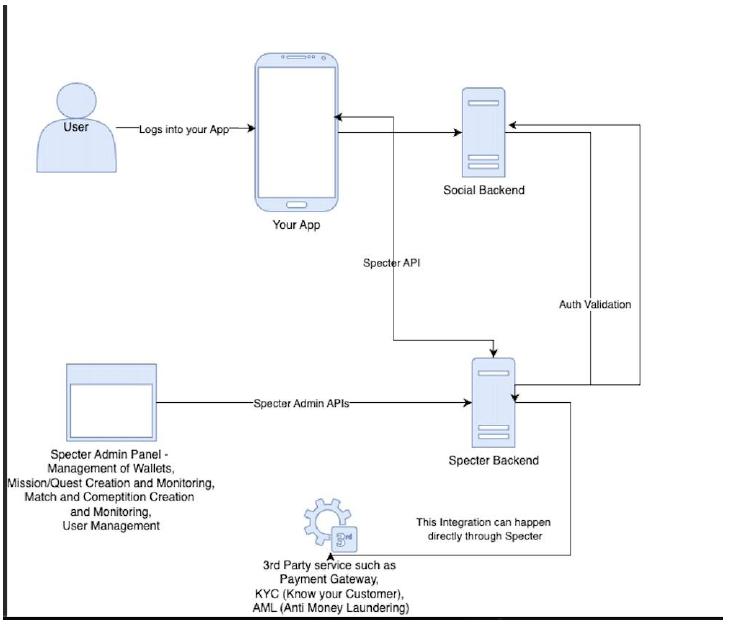
Technical Architecture Diagram
Key Components Involved
1. User:
| ○ | End user accessing the GXR app. |
2. GXR Frontend:
| ○ | Mobile app interface through which the user interacts (e.g., trivia, tournaments, wallet). |
3. Social Backend:
| ○ | Handles social layer and validates users with Specter API auth validation. |
4. Specter APIs:
| ○ | Key integration layer managing RMG features, wallet operations, game mechanics, and gamification tools. |
5. Specter Admin APIs:
| ○ | Allows administrative access for managing gamification, wallets, and user data. |
6. Third-Party Integrations:
| ○ | Payment gateways (Razorpay, Stripe), AML/KYC providers, and compliance systems integrated with Specter. |
This architecture ensures seamless communication between the GXR platform and Specter while supporting backend operations, live updates, and third-party compliance tools.
User Journey Steps
1. Joining a Game/Trivia/Prediction Session
| ● | Step 1: The user logs into the GXR App and is authenticated through Specter and Afterthe user logs in through the app (authenticating with the Spector server), the app must call the Social API Login Event API to notify the Social API server. Upon receiving this event, the Social API server will call a REST API provided by Specter to fetch the user’s information for storage and synchronization purposes. | |
| ● | Step 2: The GXR frontend fetches available matches and competitions using Specter APIs. | |
| ● | Step 3: The user selects a match(e.g., trivia during a live match, prediction session, or competitive tournament). | |
| ● | Step 4: If it’s an RMG competition, the user proceeds to pay the entry fee using their in-app wallet managed by Specter. |
2. Participating in an RMG Competition
| ● | Step 1: The user’s wallet balance (handled via Specter APIs) is checked to ensure sufficient funds. | |
| ● | Step 2: The entry fee is deducted, and the user’s participation is confirmed. | |
| ● | Step 3: Specter sends a confirmation via webhooks to the GXR backend, which updates the frontend for the user. | |
| ● | Step 4: The user actively participates in the selected game or competition (e.g., answering trivia, submitting predictions, or competing in a tournament). |
3. Earning or Losing Rewards Based on Outcomes
| ● | Step 1: Specter evaluates game outcomes, processes results, and calculates winnings based on pre-defined logic. | |
| ● | Step 2: Rewards or losses are updated in the user’s wallet via Specter APIs: |
| ○ | Winning Scenario: Winnings are credited to the user’s wallet instantly or post review if GXR requires a manual review pre prize distribution. | |
| ○ | Losing Scenario: No further action; participation fee remains processed. |
| ● | Step 3: Specter triggers an event notification (via webhooks) to update the GXR app, displaying the outcome to the user (e.g., leaderboard position or game result). |
4. Redeeming Rewards or Withdrawing Winnings
| ● | Step 1: The user navigates to the wallet section in the GXR app to redeem winnings. | |
| ● | Step 2: The user initiates a withdrawal request, selecting a preferred payment method (e.g., UPI, bank transfer). | |
| ● | Step 3: Specter processes the withdrawal request through integrated payment gateways (Razorpay, Stripe, PayU, etc.). | |
| ● | Step 4: Funds are transferred to the user’s account, and the transaction status is updated in real-time via Specter webhooks. |
Summary
| ● | Joining: User is authenticated on GXR and Specter, ensuring a secure start. | |
| ● | Participation: Seamless entry into trivia, predictions, or tournaments with entry fees. | |
| ● | Results: Rewards (winnings) or losses are updated securely in the user’s wallet. | |
| ● | Withdrawal: Easy redemption of winnings through integrated payment gateways. |
API Requirements for Specter-GXR Integration
1. Authentication & User Management
To manage user onboarding and authentication seamlessly across GXR and Specter platforms:
● APIs Required:
| ○ | Auth/Sign up with Custom ID | |
| ○ | Auth/Login with Custom ID | |
| ○ | (Optional) Auth/Sign up with Email | |
| ○ | (Optional) Auth/Login with Email | |
| ○ | (Optional) Auth/Sign up with Username | |
| ○ | (Optional) Auth/Login with Username |
Usage by GXR:
| ● | Since GXR will already authenticate users on their platform, Custom ID is the best fit for a double-authentication flow. | |
| ● | GXR can generate a unique Custom ID for each authenticated user and pass it to Specter during login/signup. | |
| ● | Additional verification steps like OTP verification can be handled on GXR’s end before logging in users to Specter. | |
| ● | Other methods (Email, Username) can also be used if GXR prefers or already has similar mechanisms in place. |
2. Wallet Management (Deposits, Withdrawals, and Transfers)
For handling user wallets, validating transactions, and enabling real-money gaming (RMG) operations seamlessly.
● APIs Required:
| ○ | Wallet/Validate Deposit | |
| ○ | Wallet/Deposit | |
| ○ | Wallet/Validate Withdrawal | |
| ○ | Wallet/Withdraw | |
| ○ | Player/Get Wallet Balance | |
| ○ | Player/Get Wallet History | |
| ○ | Wallet/Update Balance |
Usage by GXR:
| ● | Validate and process deposits into user wallets securely. | |
| ● | Validate and process withdrawals, ensuring proper checks before funds are transferred. | |
| ● | Fetch and display wallet balances for users in real time. | |
| ● | Show wallet transaction history, including deposits, withdrawals, and in-app spending. | |
| ● | Update wallet balances when needed for specific use cases and manual adjustments. | |
| ● | Enable smooth money movement within the system for RMG competitions (e.g., entry fees and prize distribution). |
3. Game Mechanics
To support trivia, prediction games, tournaments, and competitive systems:
● APIs Required:
| ○ | App/Get Matches | |
| ○ | App/Get Tournaments | |
| ○ | Competition/Enter Competition | |
| ○ | Competition/Post Score to Tournament | |
| ○ | Competition/Get Tournament Result | |
| ○ | Competition/Get Tournament Ranking | |
| ○ | Matches/Create Match Session | |
| ○ | Matches/Start Match Session | |
| ○ | Matches/End Match Session |
Usage by GXR:
| ● | Retrieve and display ongoing matches, tournaments and rankings. | |
| ● | Allow users to enter RMG competitions (e.g., trivia, predictions). | |
| ● | Manage game sessions (create, start, and end). | |
| ● | Post scores and retrieve tournament results. |
4. Event Triggers and Leaderboards
For enabling dynamic events, tracking progress, and rewarding users:
● APIs Required:
| ○ | Events/Send Custom Event | |
| ○ | Leaderboards/Post Score to Leaderboard | |
| ○ | Leaderboards/Get Leaderboard Details | |
| ○ | Leaderboards/Get Leaderboard Results | |
| ○ | Player/Get Player Progress | |
| ○ | Progression/Update Marker | |
| ○ | Achievements/Grant Reward |
● Usage by GXR:
| ○ | Track user actions like completing trivia, winning predictions, or competing in matches. | |
| ○ | Send events to Specter to trigger rewards or achievements. Every API fires an event but custom events can be used for actions not defined by Specter APIs. | |
| ○ | Update and display leaderboard standings in real time. | |
| ○ | Grant rewards based on user achievements and outcomes. |
5. Badges and Inventory Management
Specter provides APIs to manage user inventories, which can be utilized for features like badges, achievements, and rewards on the GXR platform.
1. API Required:
| ○ | Get My Inventory (players/me/get-inventory) |
2. Usage by GXR:
| ○ | Badges and Achievements: |
| ■ | Fetch and display user-earned badges, achievements, and rewards. | |
| ■ | Maintain a history of accomplishments for users. |
| ○ | Reward System Integration: |
| ■ | Enable users to view, collect, and interact with their earned inventory items, such as virtual trophies or collectibles. |
| ○ | Gamification Elements: |
| ■ | Seamlessly integrate inventory items with leaderboard rewards, and Mission Outcomes |
This ensures a centralized and user-friendly system for tracking and displaying gamification elements like badges and rewards.
4. Money Flow & Wallet Integration
The Specter RMG Wallet System handles user transactions, wallet balances, game participation, prize distribution, and taxation seamlessly. Specter ensures that all fund flows, including entry fee deductions, GST, and platform fees (revenue for GXR), are properly validated, recorded, and managed in a compliant manner.
1. User Deposit Flow
| 1. | User Action: The user initiates a deposit request within the GXR app. |
| 2. | Specter Validation: |
| ○ | Specter validates the deposit request (e.g., wallet ID, deposit amount) against rules set up on the Specter Dashboard. |
| 3. | Payment Gateway Integration: |
| ○ | Specter creates an order via the payment gateway (e.g., Razorpay, Stripe, PayU). | |
| ○ | The user completes the payment, and funds are transferred to the GXR Bank Account. |
| 4. | Specter Wallet Credit: |
| ○ | Once payment is confirmed, Specter credits the user’s wallet within its internal system. | |
| ○ | Analogy: Specter acts like a casino issuing “chips” to users after receiving funds, ensuring all game-related transactions are contained within its ecosystem. |
2. Wallet Operations for Competitions
| 1. | User Action: The user pays an entry fee to participate in an RMG competition (e.g., tournaments, predictions). | |
| 2. | Wallet Deduction: |
| ○ | The entry fee is deducted from the user’s Specter wallet. |
| 3. | Fee Deductions: |
| ○ | GST Deduction: A portion of the entry fee is deducted as GST, which is recorded within the Specter system for compliance. | |
| ○ | Platform Fee: Specter also deducts the platform fee, which is recorded as GXR’s revenue. |
| 4. | Prize Pool Management: |
| ○ | The remaining amount (post-GST and platform fee) is aggregated into the Prize Pool, managed and tracked by Specter. |
Key Notes:
| ● | Specter ensures that GST and platform fees are calculated and deducted seamlessly during the wallet transaction. | |
| ● | Platform fees directly contribute to GXR’s revenue and are recorded in Specter for reporting. |
3. Prize Distribution Flow
| 1. | Competition Results: Specter calculates the results and determines the winners. | |
| 2. | Winnings Validation: |
| ○ | Winnings are validated, and applicable deductions such as TDS are applied. |
| 3. | Wallet Credit: |
| ○ | Net winnings (post-TDS) are credited to the user’s Specter wallet. |
Compliance Highlight:
| ● | GST is already deducted at the entry fee stage and recorded. | |
| ● | TDS ensures winnings comply with tax regulations before crediting. |
4. User Withdrawal Flow
| 1. | User Action: |
| ○ | The user initiates a withdrawal request from their wallet via the GXR app. |
| 2. | Specter Validation: |
| ○ | Specter validates the withdrawal request to check for sufficient funds and other business logics set up on the Specter Dashboard | |
| ○ | To prevent double withdrawal, Specter temporarily deducts the requested amount from the user’s wallet. |
| 3. | Payment Gateway Integration: |
| ○ | Specter processes the withdrawal via an integrated payment gateway (e.g., RazorpayX, Stripe, PayU). | |
| ○ | Fund Transfer: |
| ■ | The requested amount is transferred from the GXR Bank Account to the user’s bank account. | |
| ■ | If the transaction fails (e.g., due to payment gateway errors), Specter automatically refunds the temporarily deducted amount back to the user’s wallet. |
| 4. | Wallet Update: |
| ○ | If the transaction is successful: |
| ■ | The wallet balance remains updated to reflect the withdrawal. |
| ○ | If the transaction fails: |
| ■ | Specter refunds the temporarily held amount, and the user’s wallet balance is restored. |
Key Components of the System
1. GXR Bank Account:
○ Centralized account for all fund flows, including deposits and withdrawals.
2. Specter Wallet System:
○ Internal wallet that manages all user transactions securely.
○ Handles wallet balances, deductions (GST, platform fees), and winnings.
3. Payment Gateways:
○ Facilitate secure movement of funds to and from the GXR Bank Account.
4. Compliance:
○ GST: Applied and recorded during entry fee deductions.
○ Platform Fee: Deducted as part of the entry fee and recorded as GXR revenue.
○ TDS: Applied to winnings before crediting the wallet.
System Flow Summary
| 1. | Deposits: Specter validates deposits, creates payment orders, and credits user wallets post-payment. | |
| 2. | Competitions: Entry fees are deducted, GST is applied and recorded, and the platform fee is captured as GXR revenue. The remaining funds form the prize pool. | |
| 3. | Winnings: Results are validated, TDS is deducted, and net winnings are credited to wallets. | |
| 4. | Withdrawals: Specter validates and processes withdrawals via payment gateways. |
Conclusion
The GXR Wallet System, integrated with Specter, ensures:
| ● | Accurate fund management with validations at every step. | |
| ● | GST and platform fee deductions are handled seamlessly and recorded for compliance and revenue tracking. | |
| ● | Secure wallet operations, taxation compliance (GST, TDS), and efficient prize pool management. |
5. Specter Integration with KYC and AML Platforms
Specter can integrate with third-party platforms to facilitate Know Your Customer (KYC) and Anti-Money Laundering (AML) processes, ensuring secure and compliant user onboarding and transaction monitoring.
Suggested 3rd party partner - Idfy
1. KYC Integration:
| ○ | Verifies user identities during onboarding. | |
| ○ | Ensures only verified users can access the platform and participate in RMG activities. |
2. AML Integration:
| ○ | Monitors transactions against regulatory lists (e.g., sanctions, PEP, adverse media). | |
| ○ | Identifies and flags suspicious activities to maintain compliance with financial regulations. |
This integration supports secure operations while aligning with necessary regulatory standards.
GXR App - Social Module Open Specifications
| GXR App - Social Module Open Specifications | ||
| 1. Overview | ||
| 2. System Architecture | ||
| 2.1 Architecture Overview | ||
| 2.2 Communication Flow | ||
| 2.3 Authentication Flow | ||
| 2.4 Notification System | ||
| 3. Features & Screens | ||
| 3.1 Social Feed | ||
| 3.2 User Profiles | ||
| 3.3 Stories | ||
| 3.4 Hubs & Communities | ||
| 3.5 Post Creation & Interaction | ||
| 3.6 Basic Messaging | ||
| 4. Suggested API Endpoints | ||
| 4.1 Authentication Integration | ||
| 4.2 Suggested Social Feed Endpoints | ||
| 4.3 Suggested Posts & Content Endpoints | ||
| 4.4 Suggested Comments Endpoints | ||
| 4.5 Suggested Stories Endpoints | ||
| 4.6 Suggested User Endpoints | ||
| 4.7 Suggested Hubs Endpoints | ||
| 4.8 Suggested Messaging Endpoints | ||
| 5. Data Models | ||
| 5.1 User Profile | ||
| 5.2 Post | ||
| 5.3 Comment | ||
| 5.4 Story | ||
| 5.5 Hub/Community | ||
| 5.6 Message | ||
| 5.7 Notification | ||
| 6. Authentication & Security Requirements | ||
| 6.1 Authentication Flow | ||
| 6.2 Security Requirements | ||
| 7. Performance Requirements | ||
| 7.1 API Performance | ||
| 7.2 Media Handling | ||
| 8. Testing Requirements | ||
| 8.1 Testing Approach | ||
| 9. Deliverables | ||
| 9.1 Backend Development | ||
| 9.2 Documentation | ||
| 9.3 DevOps Support | ||
| 9.4.1 Infrastructure Provisioning & Management | ||
| 9.4.2 Operational Management | ||
| 9.4.3 Maintenance & Updates | ||
| 9.4.4 Capacity Planning | ||
| 10. Appendix | ||
| 10.1 Glossary | ||
| 10.2 Reference Materials | ||
| Specter Server Architecture | ||
| GXR App - Social Module Product Requirements | ||
| 1. Introduction | ||
| 2. User Personas | ||
| 2.1 Primary User Personas | ||
| 3. Key User Journeys | ||
| 3.1 First-Time Social Experience | ||
| 3.2 Daily Engagement Flow | ||
| 3.3 Match Day Experience | ||
| 4. Screen Flows & Features | ||
| 4.1 Social Feed Screen | ||
| 4.2 Stories Experience | ||
| 4.3 Post Creation & Interaction | ||
| 4.4 User Profiles | ||
| 4.5 Hubs (Community Forums) | ||
| 4.6 Messaging | ||
| 4.7 Notifications | ||
| 5. Content Types & Specifications | ||
| 5.1 Post Types | ||
| 5.2 Story Specifications | ||
| 5.3 Comment Specifications | ||
| 6. User Journey Maps | ||
| 6.1 New User Onboarding to Social Engagement | ||
| 6.2 Creating and Sharing Content | ||
| 6.3 Match Day Social Experience | ||
| 7. Feature Requirements by Priority | ||
| 7.1 Must-Have Features (MVP) | ||
| 7.2 High-Priority Features | ||
| 7.3 Nice-to-Have Features | ||
| 8. Integration Requirements | ||
| 8.1 Specter Backend Integration | ||
| 8.2 Content Syncing | ||
| 9. Implementation Considerations | ||
| 9.1 Phased Rollout Approach | ||
| 9.2 Testing Focus Areas | ||
| 10. Success Metrics | ||
| 10.1 Engagement Metrics | ||
| 10.2 Retention Metrics | ||
| 10.3 Growth Metrics | ||
| 11. Conclusion | ||
| 1. Content Discovery & Feed Algorithms | ||
| 1.1 “For You” Feed Logic | ||
| 1.2 “Following” Feed Logic | ||
| 1.3 “Trending” Feed Logic | ||
| 2. Hub (Community) Features | ||
| 2.1 Hub Discovery & Recommendations | ||
| 2.2 Hub Content Organization | ||
| 2.3 Hub Membership & Participation | ||
| 3. Social Features & User Interactions | ||
| 3.1 Social Discovery | ||
| 3.2 User Activity Signals | ||
| 3.3 Content Promotion Rules | ||
| 4. Content Moderation & Quality | ||
| 4.1 Auto-Moderation Rules | ||
| 4.2 Community Moderation | ||
| 5. Notification Logic | ||
| 5.1 Push Notification Triggers | ||
| 5.2 Smart Notification Timing | ||
| 6. Search & Discovery | ||
| 6.1 Search Ranking | ||
| 6.2 Hashtag Trending | ||
| 7. Performance & Anti-Spam Measures | ||
| 7.1 Smart Anti-Spam (Not Hard Limits) | ||
| 7.2 Content Retention | ||
| 1. | Overview |
The GXR App (“Home of Football”) is a comprehensive mobile platform that integrates social engagement, live football streaming, and real-money gaming (RMG). This document outlines the technical specifications for the development of the Social Module backend by a third-party development team.
The GXR App consists of two primary backend systems:
| 1. | Specter Backend: Existing system that handles authentication, user management, gaming, loyalty/missions, and core platform functionality | |
| 2. | Social Backend: New system to be developed by the third party to handle social features |
This document provides recommendations and guidelines for the Social Backend development and how it will integrate with both the GXR mobile application and the Specter Backend.
| 2. | System Architecture |
| 2.1 | Architecture Overview |
The GXR App architecture consists of three main components that interact with each other:
| 1. | Mobile Client Application: React Native-based mobile app that communicates directly with both backend systems |
| ○ | Communicates with Specter for authentication, gaming, and loyalty features | |
| ○ | Communicates with Social Backend for all social features |
| 2. | Specter Backend: Existing backend system that handles: |
| ○ | User authentication and profile management | |
| ○ | Real-money gaming (RMG) features | |
| ○ | Loyalty, missions, and achievements | |
| ○ | Game state and wallet management |
| 3. | Social Backend (to be developed): New backend system responsible for: |
| ○ | Social feed and posts management | |
| ○ | User social profiles and relationships | |
| ○ | Stories functionality | |
| ○ | Hub/forum features | |
| ○ | Basic non-real-time messaging | |
| ○ | Social-related notifications |
| 2.2 | Communication Flow |
The communication flow between these components works as follows:
| 1. | Mobile Client → Specter: |
| ○ | Initial authentication and token retrieval | |
| ○ | Gaming and RMG activities | |
| ○ | Mission/loyalty-related actions |
| 2. | Mobile Client → Social Backend: |
| ○ | All social feature requests (feed, posts, comments, etc.) | |
| ○ | The mobile client sends the Specter authentication token with all requests |
| 3. | Social Backend → Specter: |
| ○ | Token validation requests to verify user authentication using Specter’s existing validation endpoints | |
| ○ | User profile synchronization requests using Specter’s existing user profile endpoints | |
| ○ | No direct database access between systems |
| 2.3 | Authentication Flow |
The authentication process follows these steps:
| 1. | User logs in via the Mobile Client using either email/password or phone/OTP | |
| 2. | Specter authenticates the user and issues a JWT token to the Mobile Client | |
| 3. | For social features, the Mobile Client includes this token in requests to the Social Backend | |
| 4. | The Social Backend validates this token using Specter’s existing token validation API | |
| 5. | After validation, the Social Backend processes the request and returns the response |
| 2.4 | Notification System |
The notification system implementation will need to be discussed and finalized between the Specter team and the Social Backend team. Here are some key considerations:
| 1. | Single Firebase/OneSignal Configuration: |
| ○ | Both teams will need to agree on how this configuration is shared and managed |
| 2. | Notification Responsibilities: |
| ○ | Social Backend will need to store and manage social notifications (likes, comments, etc.) | |
| ○ | The implementation of push notification delivery needs further discussion |
| 3. | Open Discussion Point: |
| ○ | The notification implementation strategy should be finalized during the planning phase |
| ○ | Both teams should collaborate to determine the most effective notification architecture | |
| ○ | The goal is to provide a unified notification experience for users while maintaining clear separation of responsibilities |
| 3. | Features & Screens |
Based on the existing app screens, the Social Backend should support the following key features:
| 3.1 | Social Feed |
Support for the main social feed screen with multiple feed types:
| ● | “For You” (personalized) feed | |
| ● | “Following” (accounts the user follows) feed | |
| ● | “Trending” (popular content) feed |
Various post types should be supported, including standard text posts, image posts, video posts, polls, and other content types as shown in the app screens.
| 3.2 | User Profiles |
Support for user profile screens with:
| ● | User stats (followers, following, posts) | |
| ● | User post history display |
| 3.3 | Stories |
Support for ephemeral content (stories):
| ● | Story creation and retrieval | |
| ● | 24-hour expiration logic | |
| ● | Story viewing tracking | |
| ● | Live status indicators |
| 3.4 | Hubs & Communities |
Support for forum-like communities:
| ● | Team/league/topic-based communities | |
| ● | Match-specific hubs for fan discussions | |
| ● | Post and comment organization within hubs | |
| ● | Member management and moderation features | |
| ● | Public and private community options |
| 3.5 | Post Creation & Interaction |
Support for post creation and interaction:
| ● | Text posts with media (images, videos) | |
| ● | Polls (TBD) | |
| ● | Comments and replies | |
| ● | Like and reaction functionality |
| 3.6 | Basic Messaging |
Support for basic messaging features (non-real-time):
| ● | Direct messages between users | |
| ● | Message history and retrieval | |
| ● | Basic read status tracking |
| 4. | Suggested API Endpoints |
The following are suggested API endpoints that the third-party team may consider implementing for the Social Backend. These are recommendations and can be modified as needed during the development process.
| 4.1 | Authentication Integration |
Specter already provides the following endpoints for authentication that the Social Backend should use:
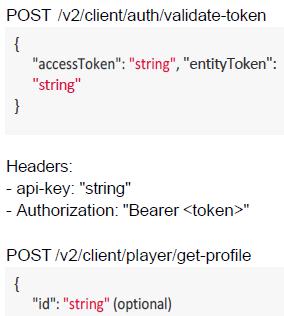
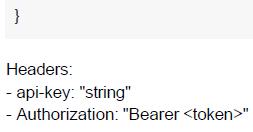
The Social Backend should integrate with these existing endpoints for token validation and user profile retrieval.
| 4.2 | Suggested Social Feed Endpoints |
| Endpoint | Method | Purpose | ||
| /feed | GET | Retrieve personalized feed | ||
| /feed/followi ng | GET | Retrieve feed from followed accounts | ||
| /feed/trendin g | GET | Retrieve trending content |
| 4.3 | Suggested Posts & Content Endpoints |
| Endpoint | Method | Purpose | ||
| /posts | POST | Create new post | ||
| /posts | GET | Get posts with filtering | ||
| /posts/:id | GET | Get single post details | ||
| /posts/:id | PUT | Update a post | ||
| /posts/:id | DELETE | Delete a post | ||
| /posts/:id/like | POST | Like a post | ||
| /posts/:id/unli ke | POST | Unlike a post |
| 4.4 | Suggested Comments Endpoints |
| Endpoint | Method | Purpose | ||
| /posts/:id/comments | GET | Get post comments | ||
| /posts/:id/comments | POST | Add a comment | ||
| /comments/:id | GET | Get comment details | ||
| /comments/:id | PUT | Update a comment | ||
| /comments/:id | DELETE | Delete a comment | ||
| /comments/:id/replies | GET | Get comment replies | ||
| /comments/:id/replies | POST | Add a reply |
| 4.5 | Suggested Stories Endpoints |
| Endpoint | Method | Purpose | ||
| /stories | GET | Get available stories | ||
| /stories | POST | Create a story | ||
| /stories/:id | GET | Get story details | ||
| /stories/:id/views | GET | Get story viewers | ||
| /stories/:id/views | POST | Mark story as viewed |
| 4.6 | Suggested User Endpoints |
| Endpoint | Method | Purpose | ||
| /users/:id | GET | Get user profile | ||
| /users/:id/posts | GET | Get user posts | ||
| /users/:id/follow | POST | Follow a user | ||
| /users/:id/unfollow | POST | Unfollow a user | ||
| /users/followers | GET | Get user’s followers | ||
| /users/following | GET | Get users being followed | ||
| /users/search | GET | Search for users |
| 4.7 | Suggested Hubs Endpoints |
| Endpoint | Method | Purpose | ||
| /hubs | GET | Get list of hubs | ||
| /hubs | POST | Create a hub | ||
| /hubs/:id | GET | Get hub details | ||
| /hubs/:id | PUT | Update hub details | ||
| /hubs/:id/join | POST | Join a hub | ||
| /hubs/:id/leave | POST | Leave a hub | ||
| /hubs/:id/posts | GET | Get hub posts | ||
| /hubs/:id/posts | POST | Create post in hub | ||
| /hubs/:id/members | GET | Get hub members |
| 4.8 | Suggested Messaging Endpoints |
| Endpoint | Method | Purpose | ||
| /messages | GET | Get all message threads | ||
| /messages/:userId | GET | Get message thread with user | ||
| /messages/:userId | POST | Send message to user | ||
| /messages/:userId/read | POST | Mark messages as read |
| 5. | Data Models |
The following are suggested data models that the Social Backend might implement. These are provided as a reference and can be adapted based on implementation requirements.
| 5.1 | User Profile |
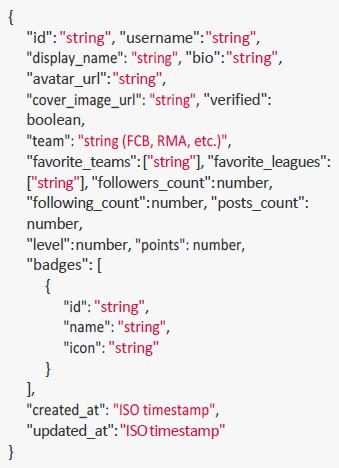
| 5.2 | Post |
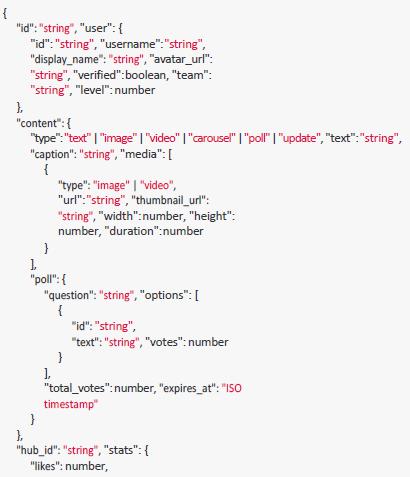
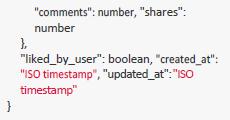
| 5.3 | Comment |
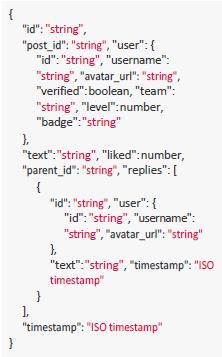
| 5.4 | Story |
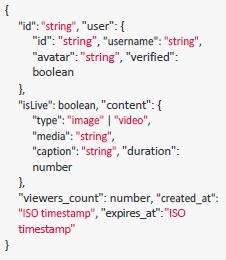
| 5.5 | Hub/Community |
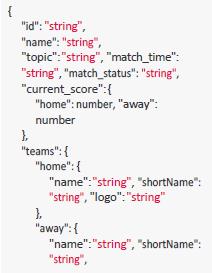
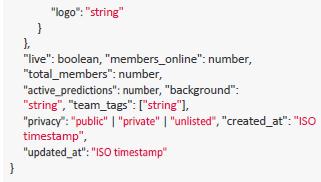
| 5.6 | Message |
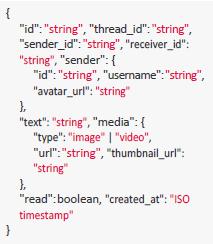
| 5.7 | Notification |

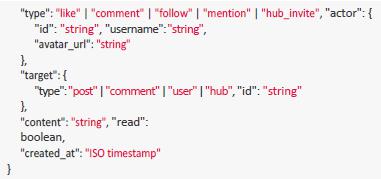
| 6. | Authentication & Security Requirements |
| 6.1 | Authentication Flow |
The Social Backend should implement the following authentication process:
| 1. | Receive requests from the Mobile Client with Specter JWT token in Authorization header | |
| 2. | Validate the token using Specter’s existing validation endpoint | |
| 3. | Extract user identity from the token | |
| 4. | Process the request based on the authenticated user’s permissions | |
| 5. | Return appropriate responses with proper status codes |
| 6.2 | Security Requirements |
| 1. | All API requests must be made over HTTPS | |
| 2. | Proper API key management for Specter backend communication | |
| 3. | Rate limiting for all endpoints to prevent abuse | |
| 4. | Input validation on all requests | |
| 5. | Content moderation systems for user-generated content | |
| 6. | Secure storage of user data | |
| 7. | Regular security audits | |
| 8. | Data privacy compliance |
| 7. | Performance Requirements |
| 7.1 | API Performance |
The Social Backend should meet the following performance criteria:
| 1. | Scalability: |
| ○ | Support for 100,000+ concurrent users | |
| ○ | Ability to handle traffic spikes during major matches |
| 7.2 | Media Handling |
| 1. | Image optimization: |
| ○ | Multiple resolutions for different device sizes | |
| ○ | Progressive loading | |
| ○ | Efficient format selection (WebP, JPEG, etc.) |
| 2. | Video optimization: |
| ○ | Thumbnail generation | |
| ○ | Multiple quality levels | |
| ○ | Efficient caching strategies |
| 8. | Testing Requirements |
| 8.1 | Testing Approach |
The Social Backend should be thoroughly tested using:
| 1. | Unit testing: For core business logic | |
| 2. | Integration testing: For API endpoints and Specter integration | |
| 3. | Performance testing: To validate performance requirements | |
| 4. | Security testing: To identify vulnerabilities |
| 9. | Deliverables |
The third-party development team is expected to deliver:
| 9.1 | Backend Development |
| 1. | Complete Social Backend implementation with all required API endpoints | |
| 2. | Database schema and data models | |
| 3. | Integration with Specter APIs for authentication | |
| 4. | Notification system implementation as agreed upon in planning | |
| 5. | Media handling and optimization |
| 9.2 | Documentation |
| 1. | API documentation for all endpoints (OpenAPI/Swagger/Postman) | |
| 2. | Integration guide for the Mobile Client team | |
| 3. | Deployment and operation instructions | |
| 4. | Database schema documentation |
| 9.3 | DevOps Support |
| 1. | Deployment scripts and configuration | |
| 2. | Monitoring setup | |
| 3. | Backup and disaster recovery processes |
| 9.4.1 | Infrastructure Provisioning & Management |
| ● | Designing and deploying the complete cloud infrastructure required for the Social Backend | |
| ● | Selecting appropriate cloud services and infrastructure components based on performance requirements | |
| ● | Provisioning and configuring all production, staging, and development environments | |
| ● | Infrastructure-as-code implementation for reproducible deployments |
| 9.4.2 | Operational Management |
| ● | Monitoring and operational support of the production environment | |
| ● | Performance optimization and scaling of resources as needed | |
| ● | Security patch management and regular system updates | |
| ● | Implementation of logging and alerting systems | |
| ● | Incident response and resolution |
| 9.4.3 | Maintenance & Updates |
| ● | Regular maintenance windows and planned downtime management | |
| ● | Database maintenance including backups, optimization, and scaling | |
| ● | System upgrades and security patches | |
| ● | Coordinating deployment schedules with the Specter team |
| 9.4.4 | Capacity Planning |
| ● | Monitoring resource utilization and planning for capacity increases | |
| ● | Implementing auto-scaling solutions where appropriate | |
| ● | Providing regular capacity planning reports and recommendations |
| 10. | Appendix |
| 10.1 | Glossary |
| ● | GXR: The parent app platform (“Home of Football”) | |
| ● | Specter: The core backend service handling authentication, user management, and gaming features | |
| ● | Social Backend: The backend system to be developed for social features | |
| ● | Hub: Topic or interest-based community within the Social Module | |
| ● | Story: Ephemeral content that disappears after 24 hours | |
| ● | RMG: Real Money Gaming features within the platform |
| 10.2 | Reference Materials |
| ● | Figma prototype links: |
| ● | Old Prototype: |
https://www.figma.com/proto/gCYHVmFdr6CqUcyqbQd9vD/GXR-Prototype?pag e-id=1%3A2865&node-id=1%3A2872&scaling=min-zoom&content-scaling=fixed &starting-point-node-id=1%3A2872
| ● | New Social Features Prototype:
https://www.figma.com/proto/gCYHVmFdr6CqUcyqbQd9vD/GXR-Prototype?pag e-id=253%3A2&node-id=271%3A476&scaling=min-zoom&content-scaling=fixed &starting-point-node-id=271%3A476 | |
| ● | Figma Screens for all pages:
https://www.figma.com/proto/gCYHVmFdr6CqUcyqbQd9vD/GXR-Prototype?pag e-id=0%3A1&node-id=0%3A1&scaling=min-zoom&content-scaling=fixed |
| ● | Expo Go app access instructions provided separately | |
| ● | Specter Console Link: https://console.specterapp.xyz/ | |
| ● | Specter API Docs Link: https://doc.specterapp.xyz/ | |
| ● | Specter Sandbox Link: https://sandbox.specterapp.xyz/ |
Specter Server Architecture
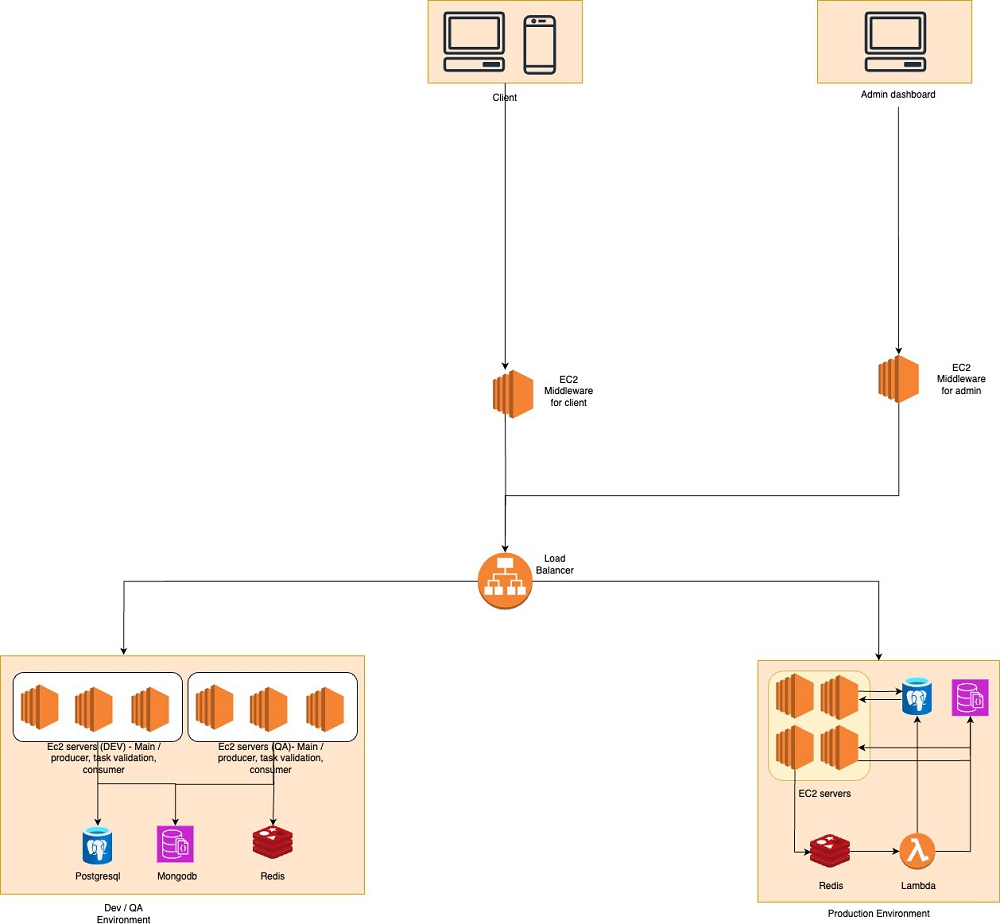
GXR App - Social Module Product Requirements
| 1. | Introduction |
This document outlines the product requirements for the Social Module of the GXR App. It complements the technical specifications by focusing on user flows, screen functionality, and feature requirements from a product perspective.
| 2. | User Personas |
| 2.1 | Primary User Personas |
| 1. | Social Football Fan |
| ○ | Primarily interested in connecting with other fans |
| ○ | Enjoys sharing opinions and reactions during matches |
| ○ | Follows favorite players and teams |
| 2. | Content Consumer |
| ○ | Primarily looks for football news, highlights, and updates |
| ○ | Reads discussions more than contributes |
| ○ | Uses the app to stay informed about football events |
| 3. | Engaged Gamer |
| ○ | Actively participates in RMG features |
| ○ | Shares predictions and results |
| ○ | Competitive and achievement-oriented |
| 3. | Key User Journeys |
| 3.1 | First-Time Social Experience |
| 1. | User completes initial app onboarding |
| 2. | User is prompted to select favorite teams, players, and leagues |
| 3. | Initial social feed is populated based on these preferences |
| 4. | User is guided to follow recommended accounts and join relevant hubs |
| 5. | User receives a notification about their first achievement |
| 3.2 | Daily Engagement Flow |
| 1. | User opens app and lands on the Social Feed |
| 2. | User scrolls through feed, viewing a mix of content types |
| 3. | User interacts with posts (likes, comments) |
| 4. | User checks and views available stories |
| 5. | User navigates to Live Matches or other sections based on interests |
| 3.3 | Match Day Experience |
| 1. | User receives notification about upcoming match |
| 2. | User accesses match-specific hub before the match |
| 3. | During match, user engages with live discussion in the hub |
| 4. | User creates and shares content about the match |
| 5. | User views related stories and posts from other fans |
| 4. | Screen Flows & Features |
| 4.1 | Social Feed Screen |
Purpose: Primary entry point providing a personalized stream of content
User Story: As a user, I want to view a stream of relevant content so I can stay updated on football news, opinions, and activities from accounts I follow.
Features & Components:
| 1. | Top Navigation Bar |
| ○ | App logo (left) |
| ○ | Wallet/Points indicator (right) |
| ○ | Notification bell (right) |
| 2. | Feed Filter Tabs |
| ○ | For You (personalized algorithm-based content) |
| ○ | Following (content exclusively from followed accounts) |
| ○ | Trending (popular content across the platform) |
| 3. | Stories Carousel |
| ○ | Horizontal scrolling row of circular profile icons |
| ○ | “Your Story” option with plus icon |
| ○ | Stories from followed accounts |
| ○ | LIVE indicator for streaming stories |
| 4. | Live Matches Section |
| ○ | Card showing current live matches |
| ○ | Team logos and score |
| ○ | “Watch Now” CTA |
| ○ | Swipeable if multiple matches are live |
| 5. | Post Types in Feed |
| ○ | Standard posts (text with optional media) |
| ○ | Image posts (single or multiple images) |
| ○ | Video posts (auto-play on scroll) |
| ○ | Poll posts (interactive voting) |
| ○ | Update posts (match updates, news) |
| ○ | Promo posts (special announcements) |
| 6. | Post Interaction Elements |
| ○ | Like button |
| ○ | Comment button |
| ○ | Share button |
| ○ | Action menu (report, hide, save) |
Interaction Flows:
| 1. | Pull-to-refresh: Updates feed with latest content |
| 2. | Tapping story circle: Opens story viewer screen |
| 3. | Tapping “Your Story”: Opens story creation flow |
| 4. | Post engagement: |
| ○ | Tapping like: Increments like count |
| ○ | Tapping comment: Expands comment section |
| ○ | Tapping share: Opens sharing options |
| ○ | Long-pressing: Shows reaction options |
| 5. | Tapping “Watch Now”: Navigates to live stream |
| 4.2 | Stories Experience |
Purpose: Provide ephemeral content sharing and viewing
User Story: As a user, I want to create and view short-lived content to share moments and see real-time updates from other users.
Features & Components:
| 1. | Story Creation Screen |
| ○ | Camera/gallery access |
| ○ | Text overlay tools |
| ○ | Filters and effects |
| ○ | Drawing tools |
| ○ | Stickers/GIFs |
| ○ | Audience selection (public/followers) |
| 2. | Story Viewer Screen |
| ○ | Fullscreen display of stories |
| ○ | Tap to skip/advance |
| ○ | Swipe to next/previous user |
| ○ | View count indicator |
| ○ | Reply input field |
| ○ | Quick reaction buttons |
| 3. | Story Types |
| ○ | Photo stories |
| ○ | Video stories (max 15 seconds) |
| ○ | Text-only stories |
| ○ | Poll stories |
| 4. | Story Duration & Lifecycle |
| ○ | 24-hour visibility |
| ○ | View tracking |
| ○ | Archiving options |
Interaction Flows:
| 1. | Creating a story: |
| ○ | Tap “Your Story” → Camera interface → Capture/select media → Add text/effects → Post |
| ○ | Stories automatically expire after 24 hours |
| 2. | Viewing stories: |
| ○ | Tap on a user’s story circle → View story → Swipe for more |
| ○ | Stories auto-advance after their duration |
| ○ | Tap left/right to navigate between stories |
| 4.3 | Post Creation & Interaction |
Purpose: Enable users to create and interact with various content types
User Story: As a user, I want to create posts to share my thoughts, media, and engage with the football community.
Features & Components:
| 1. | Post Creation Screen |
| ○ | Text input field |
| ○ | Media attachment button (photos/videos) |
| ○ | Poll creation option |
| ○ | Location tagging |
| ○ | User tagging |
| ○ | Hashtag support |
| ○ | Post visibility settings |
| 2. | Post Detail Screen |
| ○ | Complete post content |
| ○ | Like, comment, share actions |
| ○ | Comments section |
| ○ | Related content |
| 3. | Comment Section |
| ○ | Comment input field |
| ○ | Existing comments list |
| ○ | Reply functionality |
| ○ | Like comments option |
| ○ | Comment sorting options |
| 4. | Poll Interaction |
| ○ | Vote option selection |
| ○ | Real-time results display |
| ○ | Expiration countdown |
Interaction Flows:
| 1. | Creating a post: |
| ○ | Tap “New Post” → Enter text → Add media (optional) → Add location/tags (optional) → Post |
| 2. | Commenting on a post: |
| ○ | Tap comment icon → View existing comments → Enter comment → Post comment |
| 3. | Replying to comments: |
| ○ | Tap reply on a comment → Enter reply → Post reply |
| 4. | Creating a poll post: |
| ○ | Select poll option during post creation → Add question → Add options (2-4) → Set duration → Post |
| 4.4 | User Profiles |
Purpose: Display user information, activity, and enable social connections
User Story: As a user, I want to view profiles to learn more about other users and manage my own profile information.
Features & Components :
| 1. | Profile Header |
| ○ | Profile picture/avatar |
| ○ | Cover photo |
| ○ | Username and display name |
| ○ | Bio/About section |
| ○ | Follower/Following counts |
| ○ | Action buttons (Follow/Message) |
| 2. | Profile Content Tabs |
| ○ | Posts (user’s created content) |
| ○ | Media (photos and videos) |
| ○ | Liked (content the user has liked) |
| 3. | Profile Settings |
| ○ | Edit profile information |
| ○ | Privacy settings |
| ○ | Notification preferences |
| ○ | Blocked accounts management |
| 4. | Profile Badges/Indicators |
| ○ | Verification badge |
| ○ | Level indicator |
| ○ | Special achievements |
Interaction Flows:
| 1. | Viewing a profile: |
| ○ | Tap username or avatar anywhere in the app → View profile → Scroll through content tabs |
| 2. | Following a user: |
| ○ | Visit profile → Tap Follow button → Button changes to Following |
| 3. | Editing own profile: |
| ○ | Navigate to own profile → Tap Edit Profile → Modify details → Save changes |
| 4.5 | Hubs (Community Forums) |
Purpose: Provide topic-focused community spaces for discussion and content sharing
User Story: As a user, I want to join communities focused on specific teams, leagues, or football topics to engage with like-minded fans.
Features & Components:
| 1. | Hubs Discovery Screen |
| ○ | Featured hubs |
| ○ | Recommended based on preferences |
| ○ | Categories (Teams, Leagues, Topics) |
| ○ | Search functionality |
| 2. | Hub Detail Screen |
| ○ | Hub header (name, image, member count) |
| ○ | Description and rules |
| ○ | Join/Leave button |
| ○ | Content feed specific to the hub |
| ○ | Member list |
| 3. | Match-Specific Hubs |
| ○ | Temporary hubs activated around live matches |
| ○ | Match info and score updates |
| ○ | Pre/during/post-match discussion tabs |
| ○ | Quick access to match streaming |
Interaction Flows:
| 1. | Discovering hubs: |
| ○ | Navigate to Discover tab → Browse hub categories → View hub details |
| 2. | Joining a hub: |
| ○ | View hub details → Tap Join → Receive welcome notification |
| 3. | Posting in a hub: |
| ○ | Navigate to hub → Create post (similar to main feed post creation) → Post appears in hub feed |
| 4. | Match hub experience: |
| ○ | Receive notification about match hub → Join hub → Participate in live discussion |
| 4.6 | Messaging |
Purpose: Enable basic one-to-one communication between users
User Story: As a user, I want to have private conversations with other users to discuss matches, share content, and connect personally.
Features & Components:
| 1. | Chat List Screen |
| ○ | Recent conversations list |
| ○ | User search |
| ○ | Online status indicators |
| ○ | Message preview |
| ○ | Timestamp |
| 2. | Chat Detail Screen |
| ○ | Message history |
| ○ | Message input field |
| ○ | Media attachment option |
| ○ | User info/profile access |
| ○ | Read indicators |
| 3. | Message Types |
| ○ | Text messages |
| ○ | Image messages |
| ○ | Video messages |
Interaction Flows:
| 1. | Starting a conversation: |
| ○ | Navigate to Chat List → Tap New Message → Select recipient → Start conversation |
OR
| ○ | Visit user profile → Tap Message button → Start conversation |
| 2. | Sending messages: |
| ○ | Enter text in input field → Tap send |
| ○ | Tap attachment → Select media → Add optional caption → Send |
| 4.7 | Notifications |
Purpose: Keep users informed about relevant activities and engagement
User Story: As a user, I want to receive timely notifications about interactions, content from followed accounts, and important events.
Features & Components:
| 1. | Notification Center |
| ○ | Chronological list of notifications |
| ○ | Notification grouping |
| ○ | Read/unread status |
| ○ | Action buttons |
| 2. | Notification Types |
| ○ | Like notifications |
| ○ | Comment notifications |
| ○ | Follow notifications |
| ○ | Mention notifications |
| ○ | Hub invitations |
| ○ | Message notifications |
| ○ | System notifications |
Interaction Flows:
| 1. | Viewing notifications: |
| ○ | Tap notification bell icon → View list of notifications → Tap notification to navigate to relevant content |
| 2. | Managing notification preferences: |
| ○ | Navigate to Settings → Notification Settings → Toggle preferences for different notification types |
| 5. | Content Types & Specifications |
| 5.1 | Post Types |
| 1. | Standard Text Post |
| ○ | Text: Up to 500 characters |
| ○ | Optional media: Up to 4 photos or 1 video |
| ○ | Support for @mentions and #hashtags |
| 2. | Media Post |
| ○ | Photos: Up to 10 images, swipeable carousel |
| ○ | Videos: Up to 2 minutes, auto-play in feed with sound off |
| ○ | GIFs: Standard format support |
| 3. | Poll Post |
| ○ | Question text: Up to 200 characters |
| ○ | Options: 2-4 choices |
| ○ | Duration: 1 hour to 7 days |
| ○ | Results visibility settings |
| 5.2 | Story Specifications |
| 1. | Story Duration |
| ○ | Photos: 5 seconds by default (user adjustable) |
| ○ | Videos: Up to 15 seconds |
| 2. | Story Media Requirements |
| ○ | Photos: Support for portrait, landscape, and square formats |
| ○ | Videos: Support for portrait, landscape, and square formats |
| ○ | Text-only: Colored backgrounds with typography options |
| 3. | Story Interactions |
| ○ | Quick reactions (emoji responses) |
| ○ | Direct replies |
| ○ | Sharing to feed |
| 5.3 | Comment Specifications |
| 1. | Comment Structure |
| ○ | Text: Up to 300 characters |
| ○ | Optional single image attachment |
| ○ | Support for @mentions |
| ○ | Nested replies (up to 3 levels deep) |
| 2. | Comment Sorting Options |
| ○ | Most relevant (default) |
| ○ | Newest first |
| ○ | Oldest first |
| ○ | Most liked |
| 6. | User Journey Maps |
| 6.1 | New User Onboarding to Social Engagement |
Journey Touchpoints:
| 1. | User downloads the GXR App |
| 2. | User creates an account (email/phone) or signs in with social |
| 3. | User selects preferred teams, leagues, and players |
| 4. | User is presented with suggested accounts to follow |
| 5. | User’s personalized social feed is generated |
| 6.2 | Creating and Sharing Content |
Journey Touchpoints:
| 1. | User decides what type of content to create (post, story, poll) |
| 2. | User creates the content using the appropriate tools |
| 3. | User previews and edits the content before sharing |
| 4. | User publishes the content to feed or specific hub |
| 5. | User engages with feedback (likes, comments, shares) |
| 6.3 | Match Day Social Experience |
Journey Touchpoints:
| 1. | User browses pre-match content and discussions |
| 2. | User joins the match-specific hub |
| 3. | User watches match through the live streaming feature |
| 4. | User participates in post-match reactions and analyses |
| 7. | Feature Requirements by Priority |
| 7.1 | Must-Have Features (MVP) |
| 1. | Social Feed |
| ○ | Basic feed functionality with the three tab types (For You, Following, Trending) |
| ○ | Standard post types (text, image, video) |
| ○ | Basic interaction capabilities (like, comment, share) |
| 2. | User Profiles |
| ○ | Profile viewing and editing |
| ○ | Follow/unfollow functionality |
| ○ | Basic user search |
| 3. | Hubs |
| ○ | Hub discovery and joining |
| ○ | Hub-specific content feeds |
| ○ | Basic team and league hubs |
| 4. | Basic Messaging |
| ○ | One-to-one messaging |
| ○ | Text and image support |
| ○ | Conversation history |
| 5. | Post Creation |
| ○ | Text posts with media attachment |
| ○ | Basic formatting options |
| ○ | Posting to main feed or hubs |
| 7.2 | High-Priority Features |
| 1. | Stories |
| ○ | Story creation and viewing |
| ○ | 24-hour expiration logic |
| ○ | Basic interaction (view tracking) |
| 2. | Enhanced Feed |
| ○ | Media carousel support |
| ○ | Video auto-play |
| ○ | Advanced sorting algorithms |
| 3. | Comments & Replies |
| ○ | Nested comment replies |
| ○ | Comment likes |
| ○ | @mentions in comments |
| 4. | Match-Specific Hubs |
| ○ | Temporary hubs for live matches |
| ○ | Match information integration |
| 7.3 | Nice-to-Have Features |
| 1. | Advanced Stories |
| ○ | Interactive poll stories |
| ○ | Location tagging |
| ○ | Multiple media types in one story |
| 2. | Enhanced Messaging |
| ○ | Read receipts |
| ○ | Typing indicators |
| ○ | Rich media previews |
| 3. | Content Discovery |
| ○ | Advanced content recommendation algorithms |
| ○ | Explore page with trending topics |
| ○ | Content categorization |
| 4. | Bookmarking & Collections |
| ○ | Save posts for later |
| ○ | Organize saved content into collections |
| ○ | Private/public collection options |
| 8. | Integration Requirements |
| 8.1 | Specter Backend Integration |
The Social Module must integrate with the following Specter features:
| 1. | Authentication & User Identity |
| ○ | Single sign-on between systems (Cognito) or Suggested Authentication using Specter Validate Token as mentioned above |
| ○ | User profile synchronization |
| ○ | Authorization token validation |
| 2. | Wallet & Points System |
| ○ | Display wallet balance from Specter |
| ○ | Show GXR points/stars earned through social engagement |
| ○ | Redirect to appropriate screens for transactions |
| 3. | Notifications |
| ○ | Unified notification experience |
| ○ | Clear handoff for different notification types |
| ○ | Consistent notification styling |
| 8.2 | Content Syncing |
The following content types should be synchronized between systems:
| 1. | User Profile Information |
| ○ | Basic information (name, username, email) |
| ○ | Profile picture and cover photo |
| ○ | Level and achievement information |
| 2. | Preference Settings |
| ○ | Favorite teams and leagues |
| ○ | Language and region preferences |
| ○ | Privacy settings |
| 9. | Implementation Considerations |
| 9.1 | Phased Rollout Approach |
| 1. | Phase 1: Core Social Foundation |
| ○ | Social feed (basic functionality) |
| ○ | User profiles and connections |
| ○ | Basic posting capabilities |
| ○ | Authentication integration |
| 2. | Phase 2: Engagement Features |
| ○ | Comments and replies |
| ○ | Hub functionality |
| ○ | Basic notifications |
| ○ | Enhanced post types |
| 3. | Phase 3: Rich Media & Advanced Features |
| ○ | Stories implementation |
| ○ | Messaging functionality |
| ○ | Advanced media support |
| ○ | Enhanced search and discovery |
| 9.2 | Testing Focus Areas |
| 1. | User Experience Testing |
| ○ | Navigation flow efficiency |
| ○ | Content discovery effectiveness |
| ○ | Posting and interaction simplicity |
| ○ | Overall engagement metrics |
| 2. | Performance Testing |
| ○ | Feed loading times |
| ○ | Media loading optimization |
| ○ | Interaction responsiveness |
| ○ | Battery and data usage |
| 3. | Integration Testing |
| ○ | Authentication handoff |
| ○ | Profile synchronization |
| ○ | Cross-system notifications |
| ○ | Wallet and points display |
| 10. | Success Metrics |
| 10.1 | Engagement Metrics |
| 1. | Daily Active Users (DAU) |
| ○ | Target: 30% of total user base within 3 months |
| 2. | Content Creation |
| ○ | Posts per active user: 2+ weekly |
| ○ | Stories created: 15% of DAU daily |
| 3. | Interactions |
| ○ | Likes per post: 5+ average |
| ○ | Comments per post: 2+ average |
| ○ | Shares per post: 0.5+ average |
| 10.2 | Retention Metrics |
| 1. | Social Feature Retention |
| ○ | 7-day retention: 40%+ |
| ○ | 30-day retention: 25%+ |
| 2. | Time Spent |
| ○ | Average session duration: 8+ minutes |
| ○ | Daily time spent on social features: 12+ minutes |
| 10.3 | Growth Metrics |
| 1. | Network Expansion |
| ○ | Average connections per user: 15+ after 2 months |
| ○ | Hub membership: 3+ hubs per user |
| 2. | Viral Coefficient |
| ○ | K-factor: 0.3+ (each user brings 0.3 new users through sharing) |
| 11. | Conclusion |
This product requirements document outlines the user flows, screen functionality, and feature priorities for the GXR App Social Module. It should be used in conjunction with the technical specifications document to guide the development and implementation of the social features.
The focus should remain on creating a seamless social experience that enhances football fandom, encourages engagement, and integrates smoothly with the existing Specter backend services while maintaining a distinct user experience that puts social interaction at the forefront.
| 1. | Content Discovery & Feed Algorithms |
| 1.1 | “For You” Feed Logic |
Purpose: Personalized content feed that shows most relevant posts to each user
Content Selection Criteria:
| ● | User Interest Signals |
| 1. | Teams/players the user follows (highest weight) |
| 2. | Content types user engages with most (videos, images, polls) |
| 3. | Topics from hubs user has joined |
| 4. | Engagement patterns (what time they’re active, what they interact with) |
| ● | Content Scoring Factors |
| 1. | Relevance Score (40% weight) |
| ■ | Match with user’s favorite teams/leagues |
| ■ | Author is someone user follows |
| ■ | Content from user’s joined hubs |
| ■ | Similar to previously engaged content |
| 2. | Engagement Score (30% weight) |
| ■ | Total engagement (likes + comments + shares) |
| ■ | Engagement velocity (how fast it’s getting engagement) |
| ■ | Engagement from user’s network (friends’ activity) |
| 3. | Freshness Score (20% weight) |
| ■ | Newer content gets priority |
| ■ | But exceptional older content can still appear |
| ■ | Posts older than 7 days rarely shown |
| 4. | Quality Score (10% weight) |
| ■ | From verified/elite users |
| ■ | High-quality media (not blurry/low-res) |
| ■ | Meaningful text content (not just emojis) |
Diversity Rules:
| ● | No more than 2 posts in a row from same author |
| ● | Mix content types (don’t show 5 videos in a row) |
| ● | Include at least 20% content from new sources user hasn’t seen |
| ● | Balance between different teams/topics user follows |
| 1.2 | “Following” Feed Logic |
Purpose: Chronological feed from accounts user explicitly follows
Display Rules:
| ● | Pure chronological order (newest first) |
| ● | Include all content from followed accounts |
| ● | No algorithmic filtering |
| ● | Group multiple posts from same user if posted within 1 hour |
| ● | Show “You’re all caught up” message after showing last 48 hours of content |
| 1.3 | “Trending” Feed Logic |
Purpose: Surface most engaging content across entire platform
Trending Qualification:
| ● | Minimum 50 engagements in first 2 hours |
| ● | Engagement rate above platform average (currently ~5%) |
| ● | Growing engagement (not declining) |
| ● | Not from blocked/reported users |
Trending Score Calculation:
| ● | Engagement velocity matters most (engagement per hour) |
| ● | Boost for content from verified users (1.5x) |
| ● | Boost for original content vs reposts (2x) |
| ● | Decay factor - older content needs higher engagement to stay trending |
Display Order:
| ● | Sort by trending score (highest first) |
| ● | Refresh every 30 minutes |
| ● | Keep content maximum 24 hours in trending |
| 2. | Hub (Community) Features |
| 2.1 | Hub Discovery & Recommendations |
Hub Categories:
| 1. | Team-Specific Hubs (e.g., “Barcelona Fans”) |
| 2. | League Hubs (e.g., “Premier League Discussion”) |
| 3. | Topic Hubs (e.g., “Transfer News”, “Match Analysis”) |
| 4. | Event Hubs (e.g., “World Cup 2026”) |
| 5. | Local Hubs (e.g., “Mumbai Football Fans”) |
Recommendation Logic:
For New Users:
| ● | Show most popular hubs in their country |
| ● | Show hubs for teams from their selected favorite leagues |
| ● | Show general football discussion hubs |
For Existing Users:
| ● | Hubs related to their favorite teams (top priority) |
| ● | Hubs their friends are active in |
| ● | Hubs related to content they engage with |
| ● | Local hubs based on their location |
| ● | Similar hubs to ones they’ve already joined |
Hub Ranking Factors:
| 1. | Relevance - How well it matches user interests |
| 2. | Activity - Posts per day, active members |
| 3. | Quality - Low spam, good moderation |
| 4. | Growth - Increasing membership and engagement |
| 5. | Network Effect - How many user’s friends are members |
| 2.2 | Hub Content Organization |
Content Streams in Each Hub:
| 1. | Hot - Currently most engaged content (last 24 hours) |
| 2. | New - Latest posts (chronological) |
| 3. | Top - Best content (by time period: day/week/month/all-time) |
| 4. | Pinned - Important posts pinned by moderators |
Hub-Specific Features:
| ● | Match threads (auto-created for relevant matches) |
| ● | Recurring discussion threads (e.g., “Monday Motivation”) |
| ● | Hub-specific polls and predictions |
| ● | Member rankings/leaderboards |
| ● | Hub achievements and badges |
| 2.3 | Hub Membership & Participation |
Joining Rules:
| ● | Public Hubs: Instant join |
| ● | Private Hubs: Require approval |
| ● | Premium Hubs: Require subscription |
Member Privileges by Reputation:
| ● | New Members (0-100 points): Can view and like |
| ● | Active Members (100-500 points): Can post with moderation |
| ● | Trusted Members (500+ points): Can post without pre-moderation |
| ● | VIP Members (1000+ points): Can create events, polls |
Reputation Points in Hubs:
| ● | Post gets 10+ likes: +5 points |
| ● | Quality comment: +2 points |
| ● | Reported for spam: -10 points |
| ● | Post removed: -20 points |
| 3. | Social Features & User Interactions |
| 3.1 | Social Discovery |
“Suggested Users to Follow” Logic:
| 1. | Users followed by people you follow (mutual connections) |
| 2. | Active in same hubs |
| 3. | Support same teams |
| 4. | Similar engagement patterns |
| 5. | Geographic proximity (same city) |
Weighting:
| ● | Followed by 3+ users you follow: High priority |
| ● | Same favorite team + active in same hub: High priority |
| ● | Only geographic proximity: Low priority |
| 3.2 | User Activity Signals |
What We Track for Personalization:
| ● | Teams/players followed |
| ● | Content liked/shared |
| ● | Time spent viewing different content types |
| ● | Active hours (when user uses app) |
| ● | Hub participation |
| ● | Friends interacted with most |
Privacy Rules:
| ● | User can opt out of personalization |
| ● | User can clear their interest history |
| ● | User can make profile private |
| 3.3 | Content Promotion Rules |
When to Boost Content:
| ● | First post from user in a week (welcome back boost) |
| ● | Significant achievement (user reached new level) |
| ● | High-quality content from new user (encouragement boost) |
| ● | Important community announcements |
Elite/Verified User Benefits:
| ● | Content gets 1.5x visibility boost |
| ● | Appears higher in search results |
| ● | Can post longer videos |
| ● | Access to exclusive features |
| 4. | Content Moderation & Quality |
| 4.1 | Auto-Moderation Rules |
Immediate Flags:
| ● | Duplicate posts (same user, same content within 24 hours) |
| ● | Excessive hashtags (more than 5) |
| ● | Spam keywords list |
| ● | Excessive capital letters (more than 50%) |
| ● | Too many mentions (more than 5 @mentions) |
Quality Thresholds:
| ● | Minimum 10 characters for posts |
| ● | Images must be > 200x200 pixels |
| ● | Videos must be < 3 minutes (non-premium users) |
| 4.2 | Community Moderation |
User Reporting:
| ● | 3 reports = automatic review |
| ● | 5 reports = temporary hide until review |
| ● | False reports = reporter gets warning |
Moderation Actions:
| 1. | Warning (first offense) |
| 2. | 24-hour mute |
| 3. | 7-day ban |
| 4. | Permanent ban |
| 5. | Notification Logic |
| 5.1 | Push Notification Triggers |
High Priority (sent immediately):
| ● | Someone followed you |
| ● | Direct message received |
| ● | Your team is playing (match start) |
| ● | You won a prediction |
Medium Priority (bundled):
| ● | Likes on your posts |
| ● | Comments on your posts |
| ● | Friend joined a hub you’re in |
Low Priority (daily digest):
| ● | Trending in your hubs |
| ● | Friend achievements |
| ● | New features |
| 5.2 | Smart Notification Timing |
| ● | Learn user’s active hours |
| ● | Don’t send during typical sleep hours |
| ● | Batch similar notifications |
| ● | Respect notification preferences |
| 6. | Search & Discovery |
| 6.1 | Search Ranking |
When User Searches:
People Results:
| 1. | Exact username matches (highest) |
| 2. | Verified/Elite users |
| 3. | Users with mutual friends |
| 4. | Active users (posted in last 7 days) |
Hub Results:
| 1. | Exact name matches |
| 2. | Most members |
| 3. | Most active |
| 4. | User’s friends are members |
Content Results:
| 1. | Recent content (last 30 days) |
| 2. | High engagement content |
| 3. | From followed users/hubs |
| 4. | Matching hashtags |
| 6.2 | Hashtag Trending |
Hashtag Qualifications:
| ● | Used 50+ times in last hour |
| ● | Growing usage (not declining) |
| ● | Not in banned list |
Display Order:
| ● | Current velocity (uses per hour) |
| ● | Total uses today |
| ● | Unique users using it |
| 7. | Performance & Anti-Spam Measures |
| 7.1 | Smart Anti-Spam (Not Hard Limits) |
Instead of daily limits, use behavior-based detection:
Spam Indicators:
| ● | Posting identical content multiple times |
| ● | Posting more than 10 times in 5 minutes (clearly automated) |
| ● | Following/unfollowing same users repeatedly |
| ● | Copy-pasting same comment everywhere |
| ● | Posting links to external sites excessively |
What We Actually Do:
| ● | Rate limiting: Slow down actions if too rapid (e.g., can’t like 100 posts in 1 second) |
| ● | Cooldowns: After 50 rapid actions, require 30-second break |
| ● | Shadow restrictions: Spammers see their content but others don’t |
| ● | New account restrictions: Can’t DM until they’ve been active for 24 hours |
Real Users Can:
| ● | Post as much quality content as they want |
| ● | Like everything they genuinely enjoy |
| ● | Comment on every post they care about |
| ● | Follow all the accounts they’re interested in |
The goal is stopping bots and spam, not limiting genuine fans who are excited about a match or having great discussions. A real football fan might post 50 times during El Clasico - that’s engagement we WANT!
| 7.2 | Content Retention |
Keep it Simple:
| ● | Posts: Kept forever (users can delete their own) |
| ● | Stories: 24 hours (standard) |
| ● | Deleted content: Actually deleted after 30 days (for recovery purposes) |
| ● | User data: Compliant with local laws |
GXR Tech Stack
App Frontend
React Native: Allowing cross platform deployment across Android, iOS and Web
Databases
| ● | MongoDB: MongoDB’s is used for in game/app events, player stats and analytics. |
| ● | PostgreSQL: PostgreSQL is used for transactional data, content data, player data and configs. |
Backend Framework
| ● | NestJS: A progressive Node.js framework for building efficient, scalable, and maintainable server-side applications. With its modular architecture, NestJS simplifies the integration of features like authentication, event handling, and microservices. |
Runtime Environment
| ● | Node.js: powers the backend, ensuring high performance and scalability for real-time applications like gaming. |
Admin Dashboard
| ● | React: React is used for the admin dashboard, enabling smooth and interactive user experiences. |
DevOps Infrastructure
| 1. | Cloud Infrastructure |
| ● | AWS (Amazon Web Services): Specter is hosted on AWS, leveraging its scalable and secure infrastructure. The following services make up our core: |
| ○ | EC2: API servers |
| ○ | S3: Media storage |
| ○ | Aurora: Postgres database |
| ○ | Lambda: On demand compute for achievements systems, event calculations and rule validations |
| ○ | CloudFront: CDN |
| ● | Load Balancers: AWS Elastic Load Balancers to distribute traffic evenly across EC2 instances, ensuring high availability and fault tolerance for both client and admin services. |
| ● | All infrastructure is contained within a private VPC |
| 5. | Monitoring and Logging |
| ● | AWS CloudWatch: Provides detailed monitoring metrics for AWS-hosted resources. |
| 6. | Caching and Message Queues |
| ● | Redis: Used for caching to speed up data retrieval and as a message broker to handle asynchronous tasks, such as event processing. |
| ● | AWS SQS: Reliable message queues for task distribution and microservice communication. |